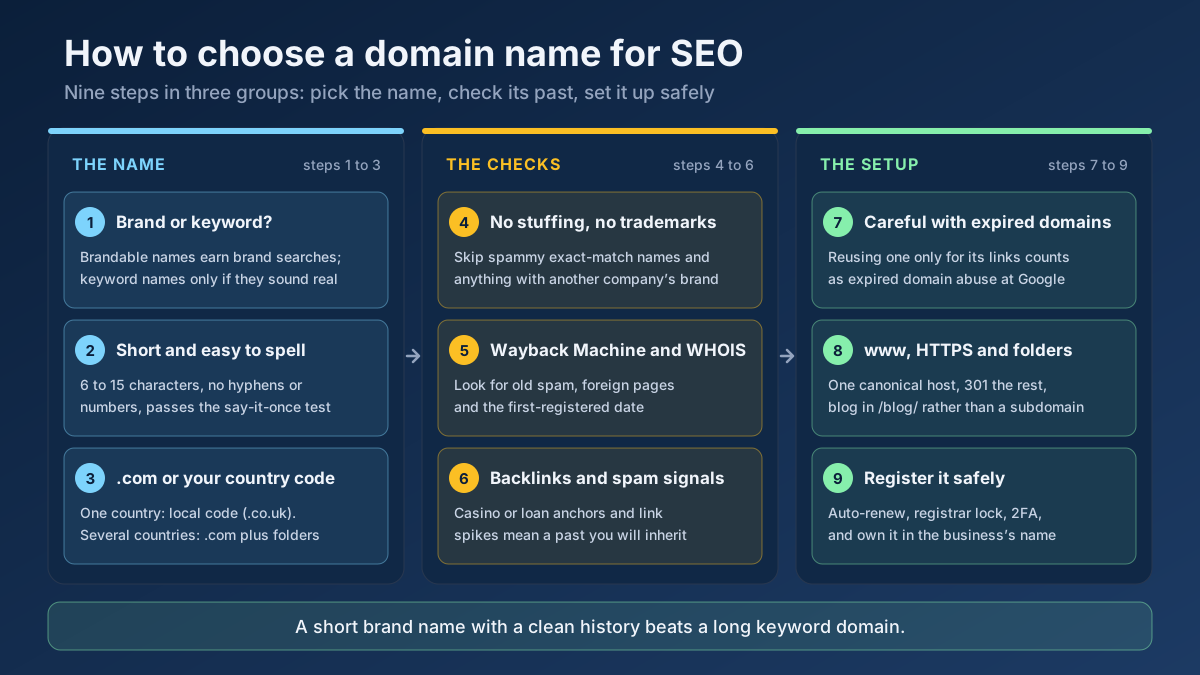
Short answer: To choose a domain name for SEO, pick a short, brandable name that is easy to say and spell, avoid hyphens, numbers and keyword stuffing, and use .com or your country’s extension if you serve one market. Before you buy, check the domain’s history in the Wayback Machine, WHOIS and a backlink checker so you do not inherit someone else’s spam.
Your domain is the one SEO decision that is genuinely expensive to undo. Titles, content and links can be fixed next week. A domain change means redirecting every URL, waiting for Google to process the move and accepting a few weeks of shaky rankings even when everything goes right. The good news is that the rules for picking a domain are simpler than most domain-sales pages suggest. Keywords in the name matter far less than they did fifteen years ago, while the domain’s past and how memorable it is matter more. This guide walks through nine steps we use when helping people pick or buy a domain, with real examples, a comparison of extensions and a pre-purchase checklist you can copy.
Does your domain name affect SEO?
Yes, but not in the way most people expect. A domain name has very little direct ranking power. Google does not reward a site because its name contains “cheap flights” or “best plumber”. What the domain does affect is everything around ranking: how often people remember and search for your brand, how likely they are to click your result, which country Google thinks you serve, and whether the domain carries baggage from a previous owner.
The turning point came in September 2012, when Google rolled out what became known as the exact match domain (EMD) update. It reduced the visibility of low-quality sites that ranked mainly because their domain matched a search phrase. Since then, Google representatives have repeated the same message many times: you do not need keywords in your domain to rank, and a keyword domain will not save thin content. Sites like Amazon, Zillow and Etsy rank for millions of searches without a single descriptive word in their names.
What a domain name can and cannot do for rankings
It helps to separate the myths from the effects that are real. The table below sums up what we see in practice.
| Claim | Reality | What to do |
|---|---|---|
| A keyword in the domain boosts rankings | Tiny direct effect at most; can look spammy | Choose a brand first, a keyword only if it reads naturally |
| Older domains always rank better | Age alone is not a ranking factor; history is what counts | Check what the domain did, not just when it was registered |
| The extension decides rankings | Country extensions signal a target country; others are treated as generic | Match the extension to the market you serve |
| A memorable name helps SEO | Indirectly true: more brand searches, direct visits and clicks | Test the name out loud before you buy it |
| An expired domain gives free authority | Risky; Google treats repurposing them for rankings as spam | Only buy one you would use for the same topic |
Step 1: Decide between a brand name and a keyword name
This is the first fork in the road, and it shapes everything else. A brandable domain is a name that means something because you make it mean something: Canva, Trello, Monzo. A keyword domain describes what you sell: londonbikerepair.com, organicdogfood.com. A hybrid mixes the two: BikeHub, DogFoodLab.
For most businesses we recommend a brandable or hybrid name. Brand names are easier to protect, easier to grow beyond your first product and more likely to earn brand searches, which are one of the clearest signs to Google that people trust you. They also look better in a link: a journalist is far more comfortable linking to “Monzo” than to “best-cheap-bank-account-uk.com”.
A keyword name can still make sense for a small local service that will never change what it does, or for a single-topic project where the name doubles as a description. The test is simple: would the name still sound like a real business if search engines did not exist? “Leeds Sash Windows” passes. “Cheap-Sash-Windows-Leeds-Best” does not.
Brand, keyword or hybrid: a quick comparison
| Type | Example | Strengths | Weaknesses |
|---|---|---|---|
| Brandable | Lumora.com | Memorable, easy to trademark, room to grow | Needs marketing to give the name meaning |
| Hybrid | LumoraLighting.com | Brand plus a hint of the topic | Longer; can feel limiting if you expand |
| Keyword (exact match) | LedLightingStore.com | Instantly descriptive | Generic, hard to protect, can look spammy |
| Keyword with location | BristolElectricians.co.uk | Clear for local searchers | Locks you into one city and one service |
Step 2: Keep it short, easy to say and easy to spell
A domain that people mistype or forget leaks traffic you have already earned. We use the “radio test”: say the domain out loud once to someone, then ask them to type it without seeing it. If they hesitate over spelling, add a letter or ask whether there is a hyphen, the name needs work.
Practical guidelines that hold up well:
- Aim for 6 to 15 characters before the extension. Shorter names are easier to remember, fit better in search results and look cleaner on a business card.
- Use one to three real words at most. Every extra word is another place to misspell.
- Avoid hyphens. They are not a ranking problem, but people forget them, and multi-hyphen domains are strongly associated with spam.
- Avoid numbers unless they are part of the brand. “Four” or “4”? Your visitors will guess wrong half the time.
- Avoid double letters at word joins, such as “presssupply” or “shoppingguide”. They cause typos and look odd.
- Check how it reads without spaces. Some innocent phrases form unfortunate words once joined, so read the name in lowercase as one string.
Length is not a ranking factor in itself. The reason it matters is human: a short, clear domain earns more direct visits, more brand searches and more clicks in search results, and those are the signals that compound over years.
Step 3: Pick the right domain extension
The extension, or top-level domain (TLD), is the part after the dot. It is the one part of a domain Google openly uses as a targeting signal, so it deserves a careful choice.
Google’s guidance on managing multi-regional sites explains the logic. Country-code extensions such as .co.uk, .de or .com.tr tell Google that the site is aimed at that country. Generic extensions such as .com, .org and .net carry no country signal, so you can target any market with them. A few country codes, including .io and .co, are treated as generic because they are widely used that way. Newer generic extensions such as .shop, .agency or .tech are handled like any other generic TLD: they are not penalised, and they do not get a bonus either.
Which extension is best for SEO?
| Extension | Best for | SEO effect | Watch out for |
|---|---|---|---|
| .com | Most businesses, international audiences | Generic; no country signal | Good names are taken; budget for a premium or a creative name |
| Country code (.co.uk, .de, .com.tr) | Businesses serving one country | Strong signal for that country | Harder to rank in other countries later |
| .org / .net | Non-profits, communities, technical projects | Generic | Visitors may type .com by habit |
| .io / .co | Start-ups and software | Treated as generic by Google | Less familiar to non-technical audiences |
| New gTLDs (.shop, .agency) | Niche brands when .com is gone | Neutral, no bonus or penalty | Some cheap extensions attract spam, which can hurt email delivery and trust |
Our rule of thumb: if you serve one country and plan to stay there, the local extension is a strong choice and often reads as more trustworthy to local buyers. If you serve several countries or might later, take the .com and build country sections in folders. Whatever you choose, try to also register the .com and the main local version of your name, so nobody else can build on your brand.
Step 4: Avoid exact-match spam and trademark trouble
Exact match domains are not banned, and plenty of honest businesses run on them. The problem is the pattern Google targeted in 2012: a keyword domain plus thin content plus aggressive links. If your plan relies on the domain doing the ranking work, the plan is weak no matter what the name is.
Warning signs that a keyword domain is heading the wrong way:
- The name contains a modifier like “best”, “cheap” or “top”, which sounds like an advert rather than a business.
- It stacks two or three keywords with hyphens.
- You would be embarrassed to say it out loud to a customer.
- It describes a product you might stop selling within two years.
Trademarks are the other trap. A domain that contains someone else’s brand, such as “iphonerepairshop.com” or “nikeoutletdeals.com”, can be taken from you through a UDRP complaint, and you would lose every link and ranking it built. Search your national trademark register and do a plain web search for the name before you buy. It takes ten minutes and removes a risk that can wipe out years of work.
Step 5: Check the domain’s history before you buy
This is the step most people skip, and it is the one that causes the worst surprises. Many “new” domains are not new at all. They were registered, used and dropped by someone else. If the previous owner ran a spam site, a scam shop or a link network, some of that history can still be attached to the name: spammy backlinks, a manual action, or Google simply treating the domain with suspicion.
Here is how to check a domain’s history before buying, in the order we run it:
- Look it up in the Wayback Machine. Browse snapshots from several years. You want to see nothing at all, or a legitimate site on a related topic. Red flags are pages in foreign languages unrelated to you, casino, pharma or adult content, or a page full of outbound links.
- Run a WHOIS Lookup to see the registrar, creation date and status. Then check the Domain Age Checker A domain first registered in 2009 that you are buying as “brand new” tells you it has a past worth investigating.
- Search Google for
site:domain.com. If old pages are still indexed, read them. If you see nothing for a domain that clearly had a site, that can be harmless, but treat it as a reason to look harder. - Search for the bare domain name in quotes to find forum posts, complaints or scam reports that mention it.
- Check its backlinks, which is important enough to get its own step below.
Our guide to reading WHOIS records explains each field, including the statuses that show whether a domain is about to expire, locked or in a dispute.
Real example: two domains with the same name
A small bakery owner we helped had shortlisted two available domains for the same brand: one on .com and one on .co.uk. Both looked new. The .co.uk version was clean: no snapshots, no backlinks, first registered that week. The .com version had been registered in 2014 and, according to the Wayback Machine, spent three years as a Japanese-language page about payday loans. Its backlink profile was full of links from comment spam with anchor text in several languages. The .com cost less than a premium name, but it would have started life with a profile that needed disavowing. They took the clean .co.uk, which also suited a bakery that only delivers locally.
Step 6: Review backlinks and spam signals
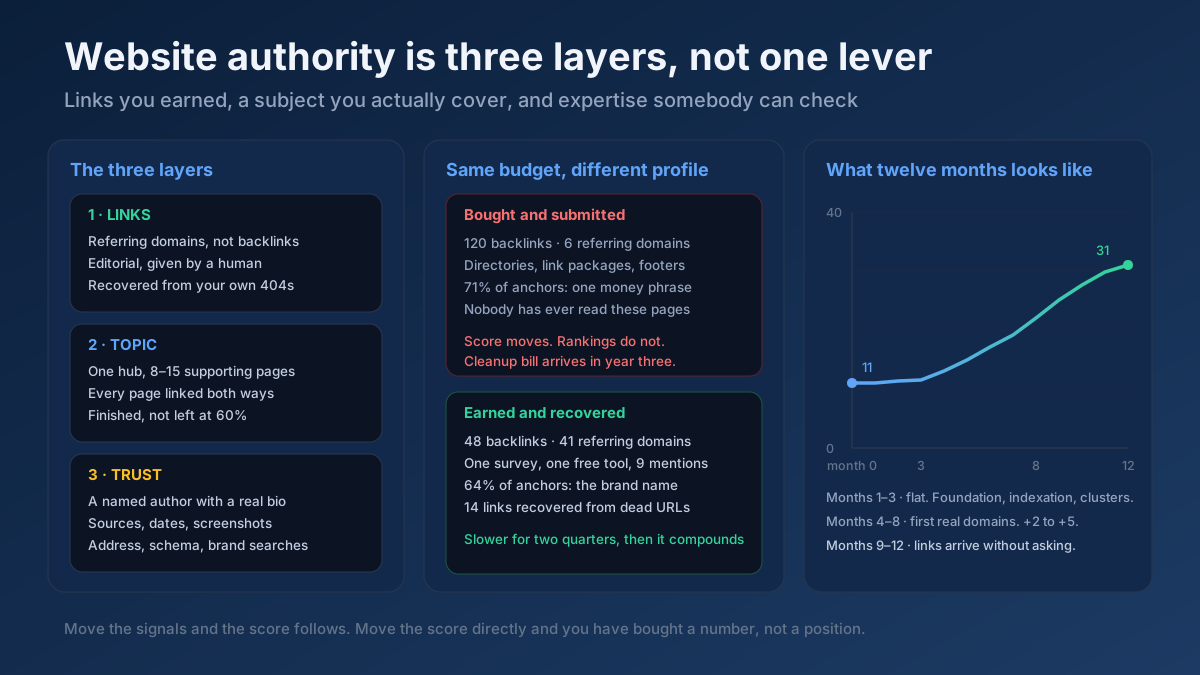
A domain’s backlinks travel with it. That is the whole appeal of an aged domain, and also its biggest risk. Run the name through our free Backlink Checker and look at four things:
- Who links to it. Real, related websites are a good sign. Hundreds of unrelated blogs, directories and forums are not.
- Anchor text. Anchors about the brand or its topic are normal. Anchors about loans, casinos, replica goods or anything in a language you do not use point to a spam past.
- Link velocity. A sudden spike of thousands of links in one month, followed by nothing, usually means a link scheme.
- Authority versus relevance. A high score from our DA/PA Checker means nothing if the links behind it are irrelevant. Third-party authority scores are estimates, not Google metrics.
If you have already bought a domain and find a messy profile, you are not stuck. Verify it in Google Search Console, check the Manual actions report, and if there are clearly manipulative links you did not build, follow our guide to toxic backlinks and the disavow tool Most of the time Google simply ignores old spam links, so disavowing is a last resort, not a first step.
Step 7: Treat expired domains with caution
Buying an expired domain for SEO is one of the most common shortcuts people ask us about. The idea is to buy a dropped domain that still has strong backlinks and either build a new site on it or redirect it to your main site. It used to work. Today it is a clear risk.
In March 2024 Google added “expired domain abuse” to its spam policies The policy describes buying an expired domain and repurposing it mainly to manipulate rankings with content that offers little value. The example Google gives is close to what many people do: a domain that used to belong to a charity or a government project, relaunched as a site about casino reviews or affiliate products.
That does not mean every previously owned domain is off limits. The difference is intent and continuity:
| Scenario | Risk | Why |
|---|---|---|
| You buy a dropped domain with the exact brand name you want and build an unrelated, honest site | Low to medium | Old links lose relevance, but you are not exploiting them |
| You buy a competitor or a closing business in your niche and keep serving the same audience | Low | Continuity of topic and users; this is a normal acquisition |
| You buy an aged domain only for its links and fill it with unrelated affiliate content | High | Matches the expired domain abuse pattern |
| You buy several expired domains and redirect them to your money site | High | Redirect-based link manipulation; often ignored or penalised |
If you still want an aged domain, pick one whose old content you would happily continue, and never pay a premium only because a tool shows a high authority number.
Step 8: Plan the technical setup before launch
Once you own the name, a handful of technical decisions turn it into a domain Google can crawl cleanly. Each one is easy at the start and painful to change later.
www or non-www
Neither is better for SEO. Pick one, make it the canonical version, and 301-redirect every other form to it: http to https, www to non-www (or the reverse), and any trailing variations. Test the result with our Redirect Checker so each variant reaches the final URL in a single hop.
HTTPS from day one
Install a certificate before anyone sees the site, and check it with the SSL Checker HTTPS is a light ranking signal, but browsers warn visitors away from insecure pages, and that cost is far bigger. If you are moving an existing site, our HTTPS migration guide covers the redirects and the Search Console steps.
Subdomain or subfolder
For a blog, a shop or a country section, we recommend subfolders such as example.com/blog/ over subdomains such as blog.example.com in most cases. Google says it can handle both, but a subfolder keeps everything inside one site from the start: one property to manage, one set of internal links and no question about whether the sections belong together. Subdomains make sense when a section is technically separate, such as a help centre on another platform. For language and country versions, read our guide to international SEO and hreflang before you decide.
DNS and email
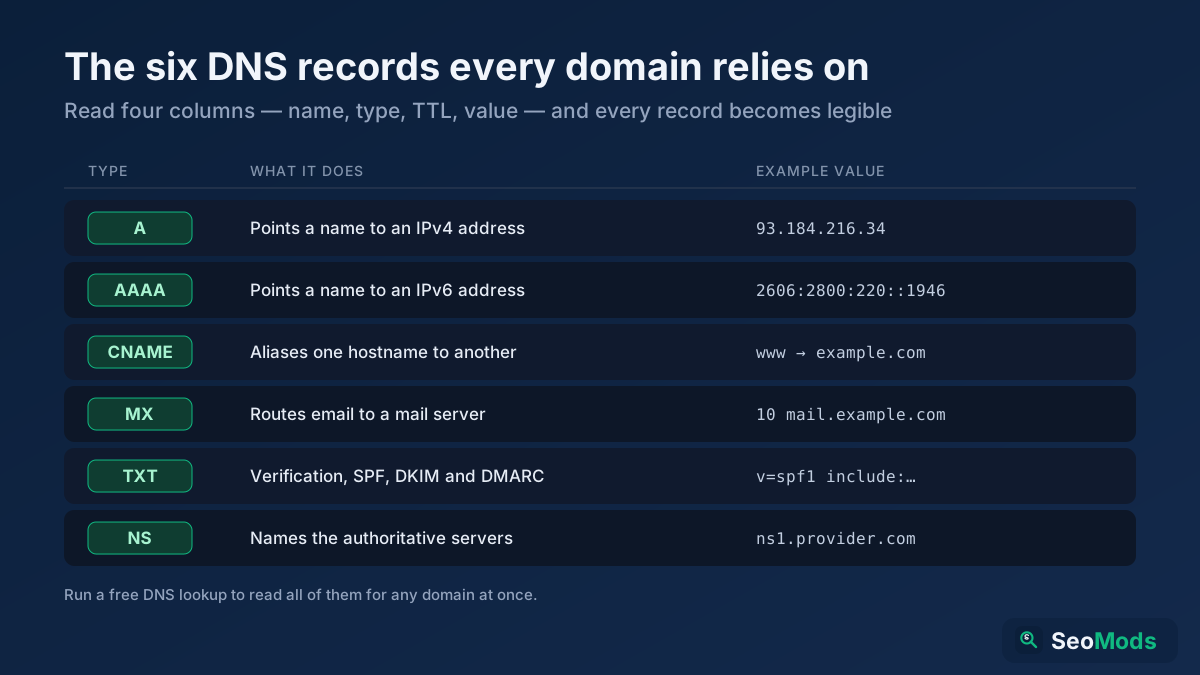
Set up DNS records carefully, especially the SPF, DKIM and DMARC records that stop your email from landing in spam. Use our DNS Lookup to confirm the records are live. Our explainer on DNS records covers what each one does.
Step 9: Register it safely and protect it
Losing a domain by accident is more common than people think. A card expires, a renewal email goes to an old inbox, and a site with years of rankings drops off the internet. Some of those names are caught by drop-catching services within minutes. Protect yours with a few simple habits:
- Turn on auto-renew and register for several years if you can. Keep the payment card up to date.
- Use an email address you will keep for the registrar account, ideally on another domain, so an outage on the main domain does not lock you out of renewals.
- Enable registrar lock and two-factor authentication. Domain hijacking usually starts with a weak registrar password.
- Register the obvious variations: the .com, your country code and common misspellings. Redirect them to your main domain with a 301.
- Keep ownership in the business’s name, not a freelancer’s or an agency’s account.
If you need to change your domain later
Sometimes a rebrand makes a move unavoidable. It can be done without losing much, as long as every old URL redirects with a 301 to its closest new equivalent, you verify both domains in Search Console and you use Google’s Change of Address tool Keep the redirects in place for at least a year, and ideally for good. Our website migration checklist and the guide on 301 vs 302 redirects walk through the details.
Domain name checklist before you buy
Copy this list and tick it off for each name on your shortlist. If a domain fails any line marked with a star, move on to the next one.
- The name passes the radio test: people can spell it after hearing it once.
- It has no hyphens or numbers, and is ideally under 15 characters.
- It still sounds like a business if you remove any keyword in it.
- The extension matches the market you serve. *
- It contains no one else’s trademark. *
- The Wayback Machine shows nothing, or a legitimate related site. *
- WHOIS and domain age match what the seller told you.
- The backlink profile has no spam anchors or unrelated link networks. *
- The matching social handles are free, or close variants are.
- You can also register the .com or local version, or know who owns it.
Common domain mistakes we see in audits
When a site’s traffic never takes off, the domain is rarely the only cause, but it is often part of the story. These are the patterns we come across most often:
- A recycled domain with a spam past. The owner had no idea, because they never checked the archive.
- Several versions that all work. http, https, www and non-www each serve the same pages, splitting signals and confusing analytics.
- A country extension for a global business. A .de site that wants to rank in the US is fighting its own targeting signal.
- A name that is too narrow. A business named after one product struggles to look relevant when it adds a second.
- Brand confusion. A name close to a bigger brand means your branded searches show their results.
- A domain that nearly expired. We have seen sites lose weeks of traffic because a renewal failed and DNS stopped resolving.
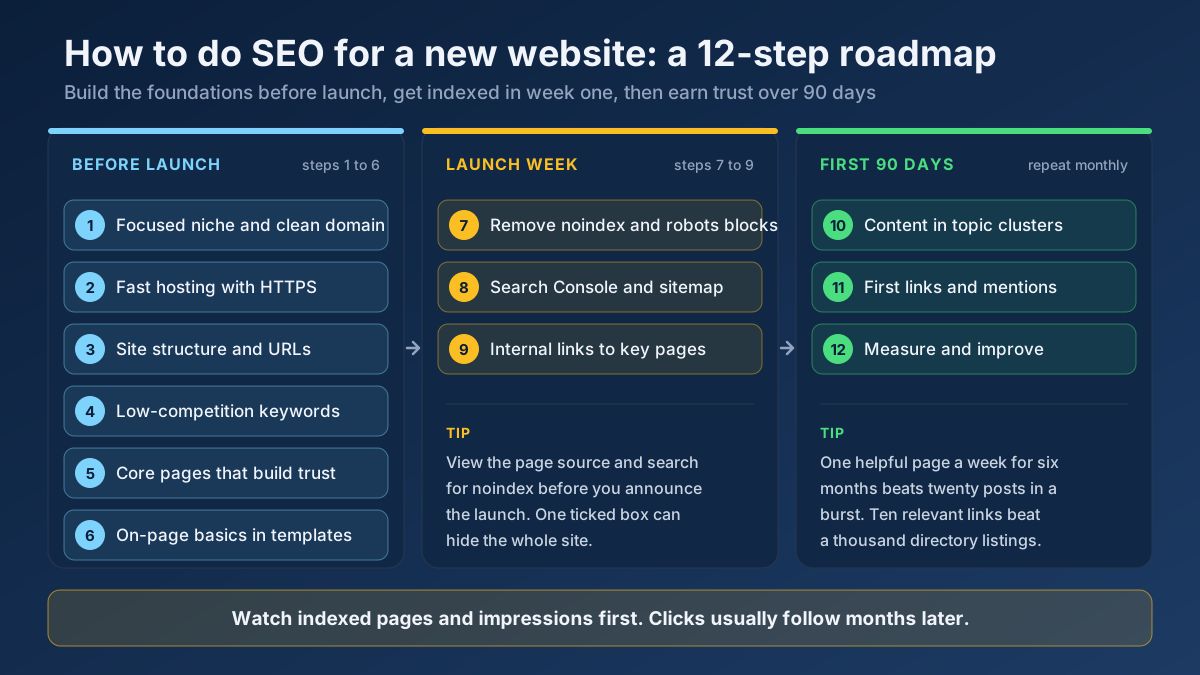
None of these are fixed by a cleverer name. They are fixed by the checks in this guide, done once, before launch. If your site is already live, run the All-in-One SEO Audit to spot redirect and HTTPS issues, then read our plan for doing SEO for a new website for the next steps after the domain is settled.
Frequently asked questions
Does a domain name affect SEO?
Only a little directly. Keywords in a domain have very small ranking weight today. The domain matters more indirectly: a memorable name earns more brand searches and clicks, the extension can signal a target country, and a domain’s history can bring spam links or penalties with it.
Is an exact match domain good for SEO?
An exact match domain is not penalised by itself, but it gives little advantage and can look spammy. Since Google’s 2012 EMD update, low-quality sites that relied on keyword domains lost visibility. A brandable or hybrid name is usually the safer long-term choice.
What is the best domain extension for SEO?
There is no single best extension. Use .com or another generic extension if you target several countries, and a country-code extension such as .co.uk or .com.tr if you serve one country. New extensions like .shop are neutral for rankings.
How do I check a domain’s history before buying it?
Browse its snapshots in the Wayback Machine, run a WHOIS lookup to see when it was first registered, search Google for site:domain.com and the name in quotes, and check its backlinks for spam anchors or unrelated link networks.
Is buying an expired domain good for SEO?
It is risky. Google’s spam policies treat buying expired domains mainly to exploit their old reputation as expired domain abuse. An old domain is only a reasonable buy if you would continue a similar, genuinely useful site on it.
Does domain age matter for SEO?
Age on its own is not a ranking factor. Older sites often rank better because they have had time to earn links and trust. A domain registered long ago but unused, or used for spam, has no advantage.
Should I use a subdomain or a subfolder for my blog?
A subfolder, such as example.com/blog/, is usually the simpler choice because it keeps all content in one site and one Search Console property. Use a subdomain only when the section runs on separate technology.
Will changing my domain name hurt my rankings?
A domain change usually causes a temporary dip. With 301 redirects for every URL, the Change of Address tool in Search Console and patience, most sites recover their rankings within a few weeks to a few months.
Applying this to your own site? See the tools picked by audience: Market / Niche Explorer: a walkthrough for Affiliate Marketers and AI Visibility Checker tips for Marketing Agencies.
Conclusion: choose a name you can build on for ten years
Choosing a domain name for SEO comes down to three questions. Is the name short, clear and brandable enough that people remember it? Does the extension match the market you serve? And is its history clean? Get those right and the domain will quietly support every page you publish. Get them wrong and you will spend months fixing problems you did not create.
Before you pay for any name on your shortlist, run it through the WHOIS Lookup and the Backlink Checker and spend five minutes in the Wayback Machine. Then set up HTTPS and one canonical version, and move on to the work that actually earns rankings: content and links.