Short answer: “Duplicate, Google chose different canonical than user” means you marked a page as the main version, but Google picked another URL as the canonical and indexed that one instead. To fix it, compare both URLs in URL Inspection, decide which one should win, then make your redirects, canonical tags, internal links and sitemap all name that same URL.
This status is frustrating because it looks like Google is ignoring an instruction you gave it. You added a canonical tag, you did things by the book, and Search Console still reports that Google went its own way. The reality is a little different. A canonical tag is a hint, not a command, and Google weighs it against everything else your site says about the page. When those signals disagree, Google picks the URL that the evidence supports. This guide explains how Google makes that choice, how to tell whether Google is wrong or simply right for reasons you had not noticed, and the nine steps that fix the problem in most cases. It also includes real numbers from our own site, so you can see what a clean result looks like.
What does “Google chose different canonical than user” mean?
The status appears in the Page indexing report under “Why pages aren’t indexed”. Google’s Page indexing report documentation defines it this way: the page is marked as canonical for a set of pages, but Google thinks another URL makes a better canonical, so Google has indexed the URL it considers canonical rather than this one.
Two terms explain the whole problem:
- User-declared canonical is the URL you nominated, usually through a
rel="canonical"tag in the page’s<head>, an HTTPLinkheader or your sitemap. - Google-selected canonical is the URL Google actually chose to represent the group of similar pages. This is the version that gets indexed, crawled most often and shown in search results.
When the two match, all is well. When they differ, the URL you nominated is filed under this status and stays out of the index. Its content is not lost, though. Google indexed the page it chose, and that page is the one that can rank. The real question is whether the page Google chose is one you are happy to see in search results.
A hint, not a directive
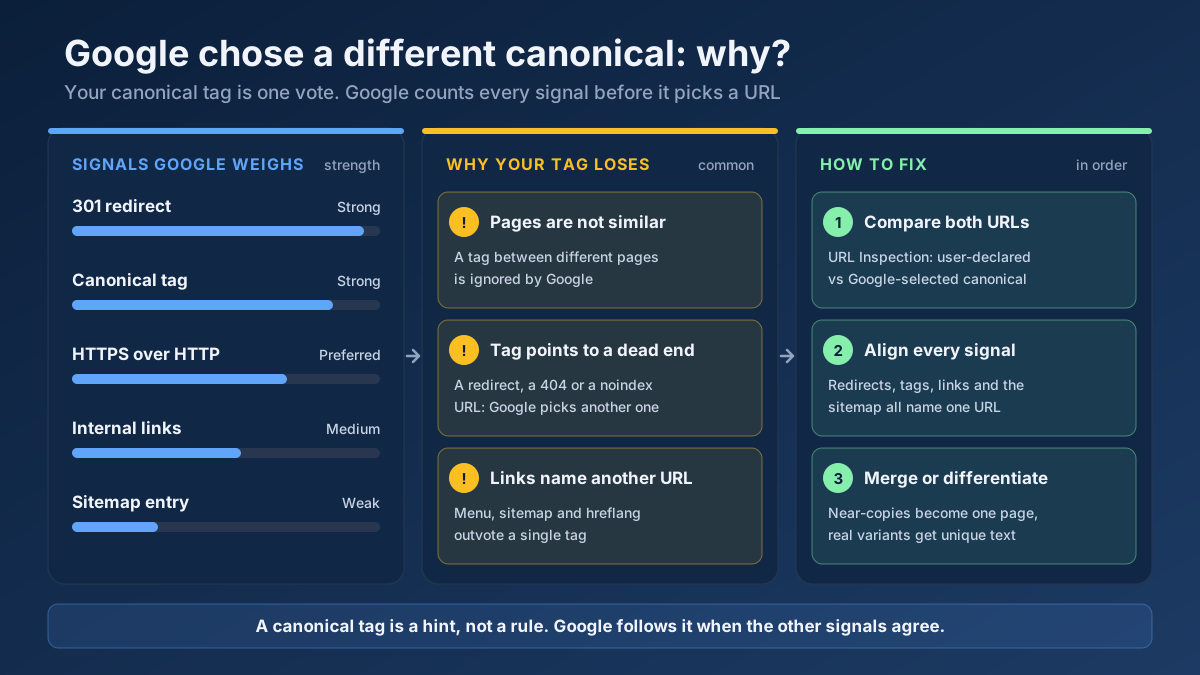
Google states this plainly in its guide to what canonicalization is: indicating a canonical preference is a hint, not a rule. When Google indexes a page, it identifies the main content, groups pages whose main content is the same or very similar, and then picks the page it considers the most complete and useful for searchers. Your canonical tag is one input to that decision. It is a strong input, but it can lose when other signals point somewhere else.
That is why the fix is rarely “add the canonical tag again”. The tag is usually already there. The fix is removing the signals that compete with it.
The three canonical statuses in Search Console, compared
Search Console has three statuses with “canonical” in the name, and they are easy to confuse. Only one of them suggests that something may need your attention.
| Status | What happened | Usually a problem? |
|---|---|---|
| Alternate page with proper canonical tag | The page points to another URL as canonical, and Google agrees | No. This is the canonical tag doing its job |
| Duplicate without user-selected canonical | The page has no canonical tag, and Google grouped it with another page and chose that one | Sometimes. Fine for parameter URLs, a problem if it is a page you want ranked |
| Duplicate, Google chose different canonical than user | You declared a canonical, and Google chose a different URL | Often worth checking. It means your signals disagree with each other |
The difference between the second and third rows matters. In “Duplicate without user-selected canonical”, you gave Google no preference and Google simply made the choice for you. In “Google chose different canonical than user”, you gave a preference and Google overruled it. The second case is a decision Google had to make alone. The third is a disagreement, and a disagreement means that at least one of your signals is pointing the wrong way.
How Google chooses the canonical URL
Google’s documentation on specifying a canonical URL ranks the methods you control by how strongly they influence the choice, and it adds a few preferences of its own. Google has also said in public talks that canonicalization looks at dozens of signals in total, so treat the table below as the part you can influence directly.
| Signal | Strength | What it tells Google |
|---|---|---|
| 301 or 308 redirect | Strong | The target of the redirect should become canonical |
rel="canonical" tag or HTTP header | Strong | The named URL should become canonical |
| Sitemap inclusion | Weak | The listed URLs are the ones you want indexed |
| HTTPS vs HTTP | Built-in preference | Google prefers the HTTPS version unless something is broken |
| hreflang clusters | Built-in preference | URLs that are part of a reciprocal hreflang set are preferred |
| Internal and external links | Supporting | The version most of the web links to looks like the main one |
The key sentence in Google’s guide is that these methods stack: when two or more of them name the same URL, the chance of that URL being chosen goes up. The opposite is also true. If your canonical tag says one thing and your sitemap, your menu and your redirects say another, you are not giving Google an instruction. You are giving it a contradiction, and it has to resolve that contradiction itself.
Why Google ignores your canonical tag
In the sites we have reviewed, the causes fall into a short list. Most cases involve one of the first four.
1. Your other signals name a different URL
This is the most common cause by a wide margin. The canonical tag points to /shoes/trail-runner, but the main menu, the breadcrumbs and the XML sitemap all link to /sale/trail-runner. From Google’s side, the whole site seems to treat the sale URL as the real page and only the tag disagrees. Google goes with the majority.
2. The pages are not actually duplicates
Google’s report text contains a sentence that people often skip: a duplicate page must be similar to the canonical, and if the user-declared canonical is not similar to the current page, Google will never choose it. If a template bug sends every product page’s canonical to the category page, Google sees that the product is not a copy of the category and ignores the tag. The same thing happens when a canonical points from a long guide to a short summary of it.
3. The pages are duplicates, just not the way you think
The reverse case is common on sites with templated pages. You have a self-referencing canonical on every city page, but the pages for Leeds and Bradford share 95 percent of their text. You declared each one canonical to itself, Google decided they are the same page and kept one. The page that lost is reported under this status. Here the canonical tag is not wrong. The content simply does not give Google a reason to keep both.
4. The canonical points to a URL Google cannot use
A canonical that leads to a redirect, a 404, a soft 404, a page blocked by robots.txt or a page with noindex sends a mixed message. Google is being asked to index a URL it cannot or should not index, so it falls back to another candidate. A relative URL that resolves to the wrong host, or a canonical that keeps a tracking parameter, belongs in the same group.
5. Protocol and host variants
Google prefers HTTPS over HTTP, but that preference can flip. Its documentation lists the triggers: an invalid certificate, insecure dependencies on the HTTPS page, a redirect from HTTPS to or through HTTP, or a canonical from HTTPS to HTTP. If your canonical names the HTTP version, or your sitemap still lists HTTP URLs after an HTTPS migration, the declared and selected canonicals can diverge.
6. Two or more canonical declarations on one page
A theme adds one canonical, an SEO plugin adds another, and a JavaScript framework rewrites it after the page loads. When a page contains several conflicting canonical tags, Google may ignore all of them. The same applies when the HTML tag and the HTTP Link header name different URLs.
7. Your content lives elsewhere too
If you republish articles on Medium or LinkedIn, or a partner syndicates your content, Google can pick the copy on the larger site as canonical. A cross-domain canonical tag on the partner’s page helps, but it is only a hint, and many platforms do not let you set one. In this case the URL in your report is yours and the Google-selected canonical sits on another domain.
Is Google actually wrong? Decide before you change anything
Before you edit a single tag, look at the URL Google chose and ask a plain question: would I be happy if this URL ranked? Very often the answer is yes. Google may have picked the HTTPS version over the HTTP one you named by mistake, the clean URL over one with a parameter, or the stronger of two near-identical posts you forgot you had written. In those cases Google has done you a favour, and the cheapest fix is to agree with it.
| What you find | Who is right | What to do |
|---|---|---|
| Google chose the HTTPS, non-parameter or trailing-slash version you actually use | Change your canonical, sitemap and links to Google’s choice | |
| Google chose an old URL, a print version or a filtered view | You | Redirect or canonicalise the stray version, update links and sitemap |
| Google merged two pages that were meant to target different searches | Neither, yet | Make the pages clearly different, or merge them into one |
| Google chose a copy on another domain | You | Ask the partner for a canonical or noindex, strengthen your own page |
| Google chose the tested page itself | Your tag points to a page that is not a duplicate. Fix the tag |
The last row is easy to miss. Sometimes URL Inspection shows that the Google-selected canonical is the page you are inspecting, while the user-declared canonical is some other URL. According to Google, this means the page is not similar to any other page. Google did not throw your page away. It ignored a canonical tag that should not have been there.
How to fix “Google chose different canonical than user” in 9 steps
Work through the steps in order. Steps one to three tell you what is really going on, steps four to eight fix the signals, and step nine confirms the result.
Step 1: Export the URLs and group them by pattern
Open Indexing › Pages, click the “Duplicate, Google chose different canonical than user” row and export the list. Sort it before you inspect anything. Patterns show up quickly: all product pages under one folder, every URL with a certain parameter, every city page, every AMP URL. A pattern means a template or a rule is responsible, and you fix it once instead of a thousand times. If the list holds only a handful of URLs, you can work through them one by one.
Step 2: Inspect a few URLs from each group
Paste one URL from each pattern into the URL Inspection tool. Under “Page indexing” you will find two lines: “User-declared canonical” and “Google-selected canonical”. Write both down for each sample. Keep in mind that the live test shows only the declared canonical. The Google-selected one is reported only for the indexed version, because it is decided during indexing. If you change something and run a live test, you will not see Google’s new choice until the page has been recrawled and processed again.
Step 3: Open the three pages side by side
Google itself recommends this step: look at the current page, the user-declared canonical and the Google-selected canonical in your browser. You are checking two things. First, are they really the same content? If the main text, the product or the answer is the same, Google has grouped them correctly and only the choice of winner is in question. Second, if they are different, how different are they? Two location pages that share everything except the city name will be grouped together however carefully you tag them. For a more objective view, paste the main text of both pages into the Text Similarity Checker and look at the overlap.
Step 4: Audit the canonical tag itself
Now check the tag on the URL you want to win and on its duplicates. Run each one through the Meta Tag Analyzer or view the page source and confirm the following:
- There is exactly one
rel="canonical"tag, and it sits inside<head>, not in the body. - It uses an absolute URL with the correct protocol and host, for example
https://www.example.com/shoes/trail-runner. - It does not include tracking parameters, session IDs or a
#fragment. - The canonical URL itself returns a 200 status, has no
noindexand is not blocked by robots.txt. - The canonical page has a self-referencing canonical, which Google recommends.
- The raw HTML and the rendered page agree. If JavaScript changes the canonical after the page loads, Google may use either value.
Also check the HTTP response headers with the HTTP Headers Checker. A server or CDN can add a Link: <…>; rel="canonical" header that disagrees with the HTML tag, and that conflict is invisible if you only read the page source. Our guide to canonical tags covers the syntax in more detail.
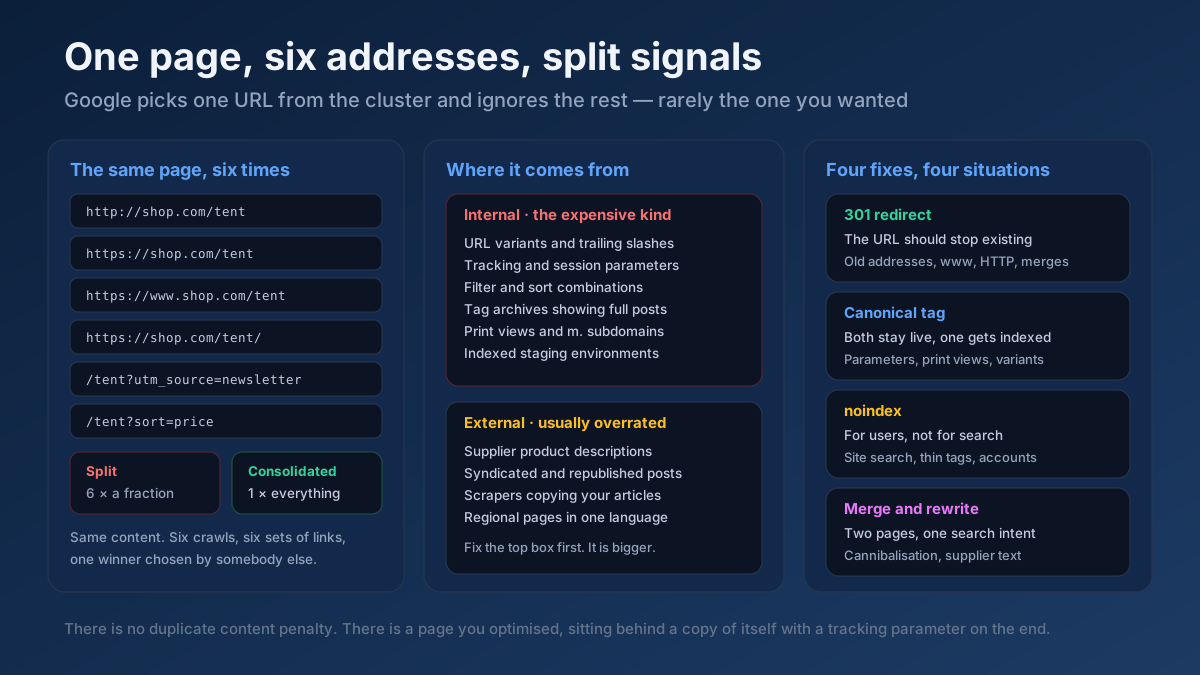
Step 5: Redirect the variants you never meant to publish
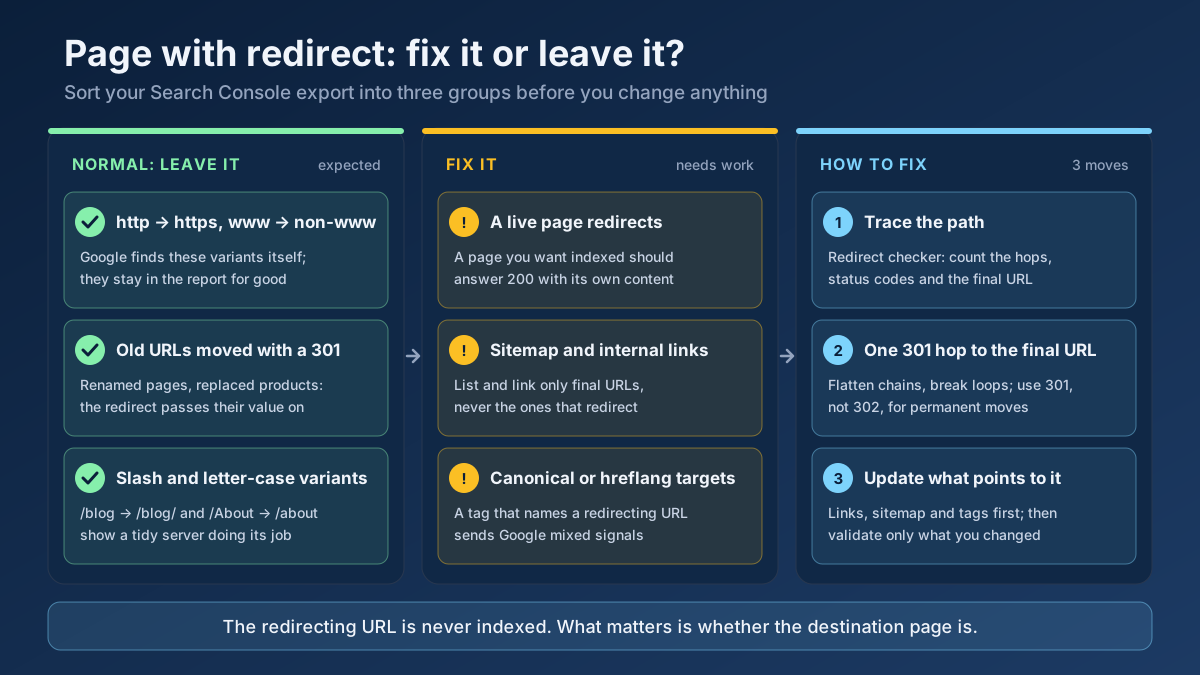
Redirects are the strongest signal available, so use them wherever a duplicate URL serves no purpose for visitors. Typical candidates are the HTTP version of the site, the www or non-www host you do not use, trailing-slash and letter-case variants, old URLs after a restructure and duplicate category paths. Each one should reach the final URL in a single 301 hop. Trace a few of them with the Redirect & HTTP Status Checker. Chains and loops weaken the signal, as our guide to the Page with redirect status explains.
Do not redirect URLs that do have a job, such as filtered views that shoppers use or tracking variants used by campaigns. For those, the canonical tag is the right tool, and the following steps make it believable.
Step 6: Point every internal link to the canonical URL
This step fixes more cases than any other, and it is the one most often skipped. Look at where your site links to the page: the main menu, the footer, breadcrumbs, related-product widgets, in-content links in your articles and pagination. Every one of them should use the exact canonical URL, including the protocol, the host and the trailing slash. A crawl with the Site Audit or the Link Analyzer will show which version your pages actually link to.
An example makes the point. An online shop places the same product under /running/ and /sale/ and sets the canonical to the running URL. During a sale, however, the homepage banner, the navigation and hundreds of internal links point to the sale URL. Google sees one tag on one side and the entire site on the other, so it chooses the sale URL. When the sale ends and those links disappear, the URL you wanted can take over, but only once Google recrawls the pages. If you link to the canonical from the start, the problem never appears. Our internal linking guide explains how to build these links on purpose.
Step 7: Clean up the sitemap and hreflang tags
Your XML sitemap should list only canonical URLs that return a 200 status. Google calls sitemap inclusion a weak signal, but a sitemap full of non-canonical URLs works against you on thousands of pages at once. Use the Sitemap Finder to locate every sitemap the site publishes, including ones created by plugins you may have forgotten, and check that the URLs inside match your canonical tags character for character. Google’s own best-practice list says it directly: do not name one URL in the sitemap and a different one in the canonical tag for the same page.
On a multilingual site, do the same for hreflang. Every hreflang annotation should point to the canonical version of each language page, and each page should name itself as canonical rather than pointing to another language. Google treats language versions as duplicates only when the main content is in the same language, so a page whose body was never translated will be grouped with the original. Our hreflang guide walks through a clean setup.
Step 8: Merge or differentiate pages that compete
If step three showed that the pages really are near-duplicates, no tag will keep both in the index for long. You have two honest options.
- Merge: if the pages answer the same question for the same reader, combine the best parts into one page and 301-redirect the other to it. This is common with two old blog posts on the same topic, and it also solves keyword cannibalization.
- Differentiate: if the pages really serve different needs, make that visible in the main content. A city page needs local details that a visitor from another city would not find on its sibling: prices, opening hours, staff, local case studies, directions. Swapping the city name in the title and the first sentence is not enough.
The Thin Content Checker helps you find pages whose unique text is too short to stand on its own, which are the pages that tend to be grouped together. Our guide to fixing duplicate content covers both options with more examples.
Step 9: Request recrawling, validate and wait
After the fixes are live, run a live test in URL Inspection on a few sample URLs to confirm that the tag, status code and indexability are correct, then click “Request indexing” for the most important ones. For the rest, go back to the report row and click “Validate fix”. Validation asks Google to recrawl the listed URLs and records whether the problem is gone.
Set your expectations about timing. Google has to recrawl both the duplicate and the canonical, process them again and update its choice. On a site that Google visits often, this can take a few days. On a smaller site with low crawl demand, it commonly takes several weeks, and validation can run for a month or more. If validation fails on URLs where Google was right in the first place, that is fine. Those URLs are supposed to stay out of the index.
Real example: what a clean result looks like on our own site
We run a nightly Search Console check on seomods.com that records, for every URL in our sitemaps, the canonical we declared and the canonical Google selected. On 15 November 2026 the check covered 916 URLs. Google had selected a canonical for 436 of them, the indexed pages plus those crawled but not yet indexed. For all 436, Google’s choice matched ours. The remaining URLs were either not yet known to Google or only discovered, so no canonical had been chosen for them.
No clever trick is behind that number. It is the result of consistency:
- Every page prints one self-referencing, absolute canonical, generated by a single function rather than per template.
- The sitemaps, hreflang tags and internal links are built from the same URL list, so they cannot drift apart.
- The site is HTTPS only, and each non-canonical variant is redirected in a single hop.
We have also seen what goes wrong when one piece slips. Earlier this autumn, the code that builds our canonical and hreflang tags produced the Turkish home page address with a trailing slash, while the server redirected that version to the address without one. The tags were pointing to a redirect, which is exactly the conflict described in step four. Fixing the function took a few minutes. The lesson is that canonical problems are usually generated by code, so you fix them in the code, not page by page.
Common scenarios by site type
The same status has different usual causes depending on what kind of site you run.
Online shops
Products that live in several categories, colour and size variants on separate URLs, and filtered or sorted category pages are the classic sources. Pick one product URL that does not depend on the category path, link to it everywhere and canonicalise the variants to it unless a variant has its own search demand. Our guides on product page SEO and faceted navigation cover the details.
WordPress sites
Watch for two SEO plugins running at once, a theme that prints its own canonical, attachment pages, and tag or category archives that repeat the same posts. In the plugin settings, check that the site address uses the correct protocol and host, because the plugin builds every canonical from it.
Multilingual and multi-regional sites
The main risk is pages that are labelled as one language but still contain another language’s body text, and regional pages in the same language that are almost identical. Use hreflang together with self-referencing canonicals, and translate or localise the main content, not just the menu.
Publishers and blogs
Syndicated copies, AMP versions that remain after AMP was turned off, and print or “amp” parameter URLs are the usual suspects. For syndication, Google now recommends that partners block indexing of the copy with noindex if you want your original to be the one shown, because a cross-domain canonical is only a hint.
Mistakes that make the problem worse
- Blocking the duplicate in robots.txt. Google cannot crawl it, so it cannot see the canonical tag on it. Google’s guide explicitly says not to use robots.txt for canonicalization.
- Adding
noindexto the duplicate as well as a canonical. These send opposite messages: one says “merge me with that page”, the other says “drop me”. Google does not recommendnoindexas a way to choose a canonical. - Using the URL removal tool. It hides every version of the URL from search, including the one you want. It is not a canonical tool.
- Pointing many different pages to the homepage. Google ignores canonicals between pages that are not similar, so this only wastes the signal.
- Chasing a zero count. Some URLs in this report belong there because Google’s choice is correct. Success means the right pages are indexed, not an empty report.
Frequently asked questions
Is “Duplicate, Google chose different canonical than user” an error?
Not always. It means your declared canonical and Google’s choice differ. If Google chose a URL you are happy to rank, such as the HTTPS or clean version, nothing is lost. It needs fixing when Google indexes a page you do not want shown, or drops a page you want ranked.
Does this status hurt my rankings?
There is no penalty involved. Google still indexes one version of the content, and that version can rank. The risk is indirect: the wrong URL may appear in results, link signals may be split across versions, and reports become harder to read because performance is credited to an address you did not expect.
Why does Google ignore my canonical tag?
Usually because other signals disagree with it. Internal links, the sitemap, redirects or hreflang name a different URL, or the pages are not similar enough to be duplicates. A canonical that points to a redirect, a 404 or a noindex page is also ignored.
How do I see which canonical Google selected?
Inspect the URL in Search Console’s URL Inspection tool and open the Page indexing section. It shows the user-declared canonical and the Google-selected canonical. The Google-selected value is only shown for the indexed version, not in a live test.
How long does it take Google to accept my canonical?
After you fix the signals, Google has to recrawl and reprocess both pages. On frequently crawled sites this can happen within days. On smaller sites it often takes several weeks, and the validation in Search Console can run for a month or longer.
Should I use a 301 redirect or a canonical tag?
Use a 301 when visitors never need the duplicate URL, for example old addresses or protocol and host variants. Use a canonical tag when the duplicate must stay accessible, such as filtered views, tracking URLs or a product listed in several categories.
Can I force Google to use my canonical?
No method forces it, because canonicals are hints. You can make your preferred URL the obvious choice by aligning redirects, canonical tags, internal links, the sitemap and hreflang so that they all name the same URL, and by keeping the content of duplicates truly similar.
What is the difference between this status and “Duplicate without user-selected canonical”?
In “Duplicate without user-selected canonical”, the page declared no canonical and Google chose one by itself. In “Google chose different canonical than user”, you did declare one and Google overruled it, which means at least one of your signals contradicts the tag.
Applying this to your own site? See the tools picked by audience: Redirect & HTTP Status Checker: a walkthrough for Ghost Users and Redirect & HTTP Status Checker: a walkthrough for Squarespace Users.
Conclusion: make every signal tell the same story
“Duplicate, Google chose different canonical than user” is not Google being stubborn. It is Google resolving a contradiction your site created, usually between the canonical tag and the links, sitemap or redirects that surround it. Start by deciding whether Google’s choice is acceptable. If it is, agree with it. If it is not, make your preferred URL the only one your site ever names, merge or differentiate pages that are too similar, and give Google a few weeks to recrawl.
The fastest way to begin is with one URL from your export. Check its tag in the Meta Tag Analyzer, trace it with the Redirect & HTTP Status Checker and look at how your own pages link to it. In most cases, the conflicting signal shows up within the first ten minutes.