High Impressions but Low Clicks: How to Fix CTR
High impressions but low clicks? Average position tells you whether it is a ranking problem or a snippet problem — and this guide gives the fix for both.
Read article →Check the Domain Rating (DR) of any website from our own link index: referring domains, their strength, the strongest linkers, follow/nofollow mix and how many links the next DR level takes. Compare up to 10 sites.
Fetching live data…
The Domain Rating Checker is a free tool that scores the strength of any website's backlink profile on the familiar 0–100 DR scale. It counts how many different domains link to the site, weighs each one by how strong it is, and turns the total into one number. Alongside the score you see the strongest referring domains, how the linkers spread across strength levels, the follow/nofollow mix and roughly how many new links the next DR level takes. No signup, no credits, up to 10 sites at once.
Domain Rating (DR) is a 0–100 measure of how strong a site's links are compared with every other site. It grows with the number of distinct domains that link to you and, much more, with how strong those domains are themselves. The scale is logarithmic: going from DR 10 to 20 takes a handful of decent links, going from 70 to 80 takes thousands. Google does not use DR; it is a comparative metric, most useful for benchmarking sites against each other and tracking your own progress.
Links from other sites are still one of the clearest signals that a page deserves to rank. DR sums that up in one number, which makes it handy for three jobs: judging whether you can compete for a keyword where the top results all sit at DR 70, vetting a site that offers you a guest post or a link, and checking that your own link building is moving the needle. Because the score is relative, compare sites inside one tool instead of mixing numbers from different checkers.
No. Ahrefs' DR comes from Ahrefs' own paid index. This is our own Domain Rating, computed from SeoMods' own link index on the same 0–100 scale. Well-known sites land within about two points of the values people usually quote; small sites can differ more, because every index finds a different handful of their links.
A DR of 0 means no other domain links to the site yet, which is normal for a new site. A DR between 10 and 20 usually means only a handful of referring domains, most of them weak. One genuine link from an established, relevant site is usually enough to move a small site up a band.
Our link index is rebuilt regularly, and every rebuild can move scores a little as new links are found and old ones disappear. Check monthly rather than daily: real progress shows up as a steady climb over several months.
Both are 0–100 link-strength scores. Domain Authority, which our DA / PA Checker reports, also predicts page-level strength and is calibrated to the Moz scale; Domain Rating looks only at the domain's backlink profile. Use whichever scale your team already works with, and compare sites on the same one.
Guides, tips and tutorials hand-picked for this tool — go from running a check to actually fixing it.
 Analytics
High impressions but low clicks? Average position tells you whether it is a ranking problem or a snippet problem — and this guide gives the fix for both.
Read article →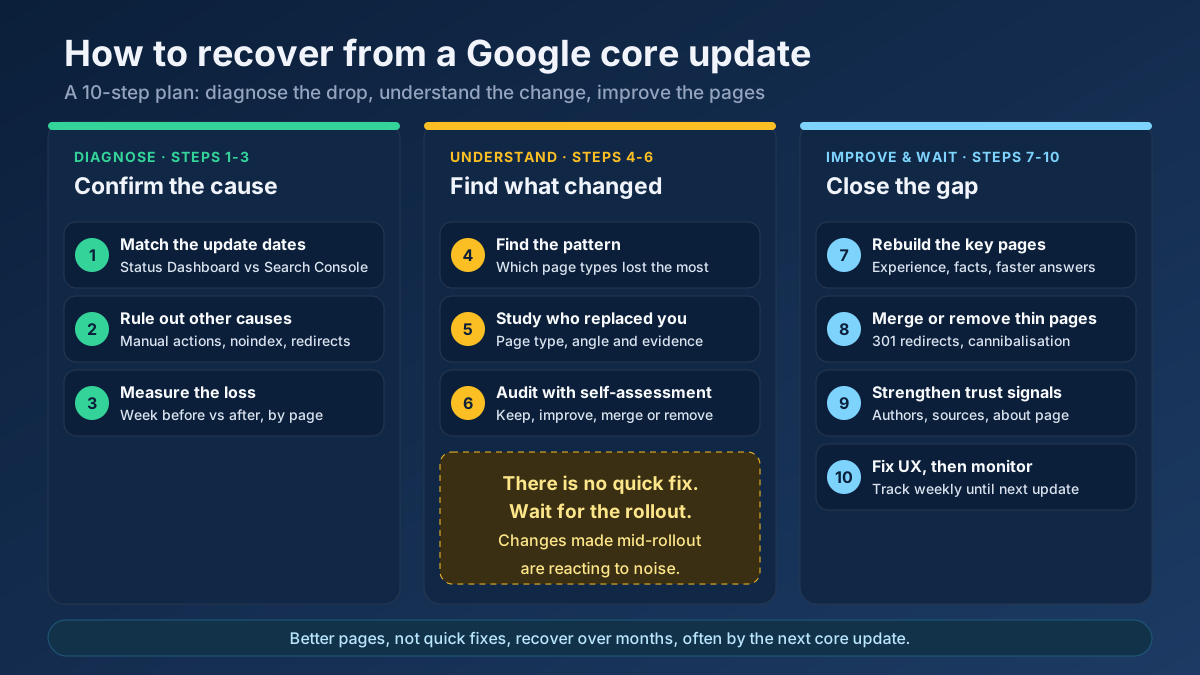 Analytics
Learn how to recover from a Google core update: confirm the drop, rule out technical issues, find the pages that lost and rebuild them in 10 clear steps.
Read article →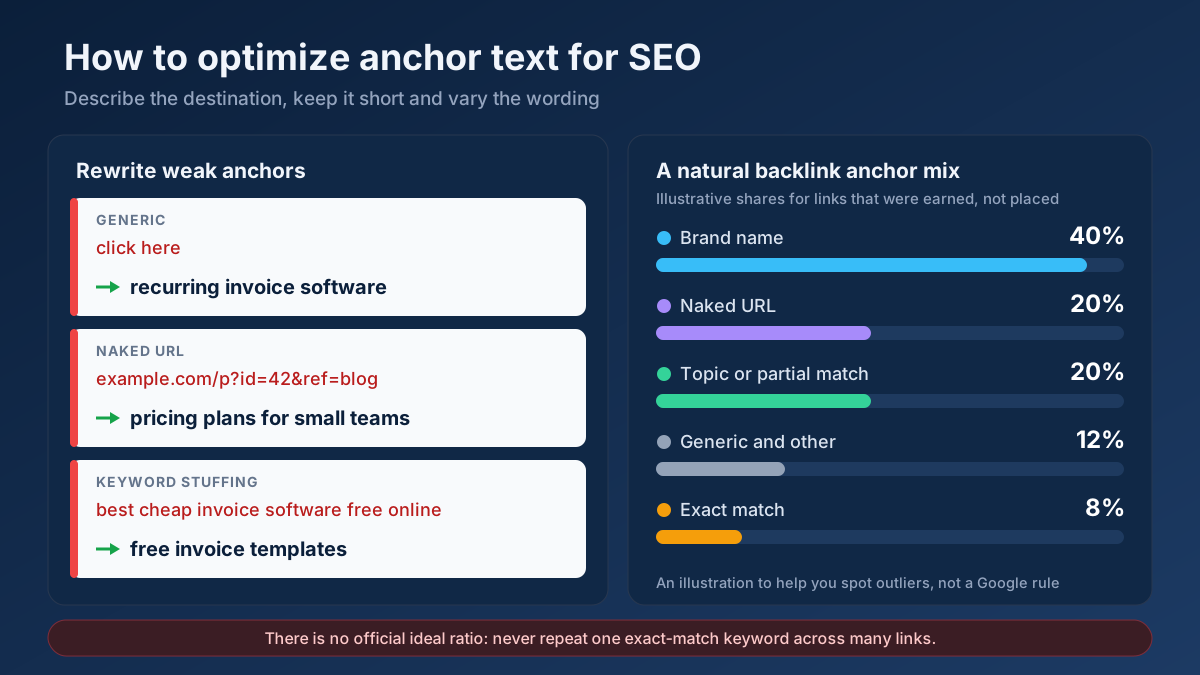 Link Building
How to optimize anchor text for SEO in 9 steps: anchor types, internal link and backlink rules, a natural ratio, rewrite examples and mistakes to avoid.
Read article →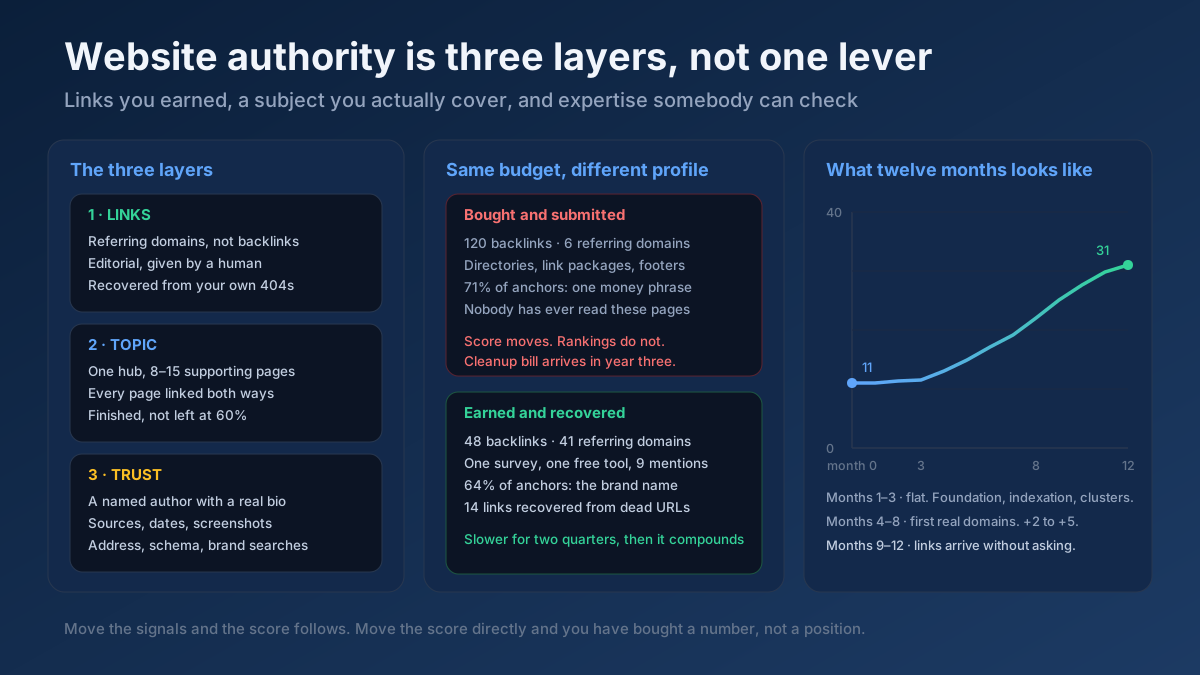 Link Building
How to increase website authority in 10 steps: what the score really measures, the link and content work that moves it, and how long each stage takes.
Read article →Spammy links can drag your site down. Here is how to identify and disavow them safely.
Read article → Analytics
Organic traffic drops for seven reasons. Read the shape of the drop, segment it in Search Console, and follow the recovery playbook for your actual cause.
Read article →Turn a messy list of spam URLs and domains into a clean Google disavow file: extracts domains, strips www, lower-cases, removes duplicates, drops URLs already covered by a domain: line, flags invalid lines and checks the 2 MB / 100,000-line limits. Download the .txt for Search Console.
Open tool →See a domain’s past from the Wayback Machine: first archived date, snapshots per year as a chart, gaps when the site was down or abandoned, and the page title of every year so you can spot topic changes (for example gambling, then a blog) before you buy an expired domain.
Open tool →Estimate any website’s monthly visits from real public popularity data: likely range, worldwide rank, 30-day trend, visits by country and the authority behind it. Compare up to 10 sites.
Open tool →Check real Domain Authority (DA) and Page Authority (PA) for any website, built on real link-graph authority data. See the raw authority index and global rank, and compare up to 20 domains at once — free, with no signup.
Open tool → EstimateEstimate where a domain ranks for a keyword by analyzing on-page relevance signals against the target term.
Open tool →Compare outbound link profiles of two competitor pages to find linking domains you could also target.
Open tool →