Why Blogger Users need this
Every Blogger blog starts with the same robots.txt. It lets the AdSense crawler see everything, blocks /search for all other bots, which covers label pages and search results, and lists the sitemap. Most blogs never need more than that, and many that changed it would have been better off leaving it alone.
The trouble starts in Settings → Crawlers and indexing. Switch on "Enable custom robots.txt" and whatever you paste replaces Blogger's file completely; nothing from the default survives unless you copy it back in. Tutorials pass around versions that block /20 archives, the ?m=1 mobile view or whole folders, and one wrong line can stop Google crawling every post. Blogger does not warn you, and Search Console reports it only after Googlebot has tried.
This tester fetches your live file, works out which group Googlebot, Googlebot-Image and Bingbot obey, and checks each URL you give it: allowed or blocked, plus the exact line that decided.
Blogger Users specific guidance
Tips for Blogger Users
Test URLs, not just the file. Put one post URL in the main field and add a label page, a search URL, a static page (/p/…) and a post with ?m=1 in the paths box. On the default file, posts, pages and ?m=1 are allowed and only the /search URLs are blocked. If anything in /2026/… or /p/ shows Blocked, the Deciding rule column names the line to delete.
Decide where label pages belong before you edit robots.txt. There are two clean set-ups. Keep Disallow: /search and Google never crawls label pages. Or allow them and use custom robots header tags (noindex for archive and search pages) so Google crawls them, follows the links to your posts and keeps them out of results. Mixing the two fails: a blocked URL's noindex is never read, and it can still show up as "Indexed, though blocked by robots.txt". Whichever you choose, run a label URL here afterwards to confirm the file says what you meant.
Check the Sitemap line. On a custom domain it should use the address readers see, normally the www one; Blogger can't host a naked domain and only redirects it. If you wrote your own file, make sure a Sitemap line is still in it; a missing one is easy to overlook because the file itself looks fine.
Common mistakes
The costly mistake is pasting a "best robots.txt for Blogger" from a tutorial without testing it. Before saving, run your post, label and page URLs here against the current file; after saving, run them again, because Blogger serves the new file immediately.
Quick start
- Enter a post URL from your blog.
- Add a label page, a
/p/page and the post with?m=1. - Every post and page must show Allowed for Googlebot.
- Check that the Sitemap line uses your real address.
- After any edit in Crawlers and indexing, test the same URLs again.
Real examples
1. Blogger's default file: posts open, label pages closed
- Situation
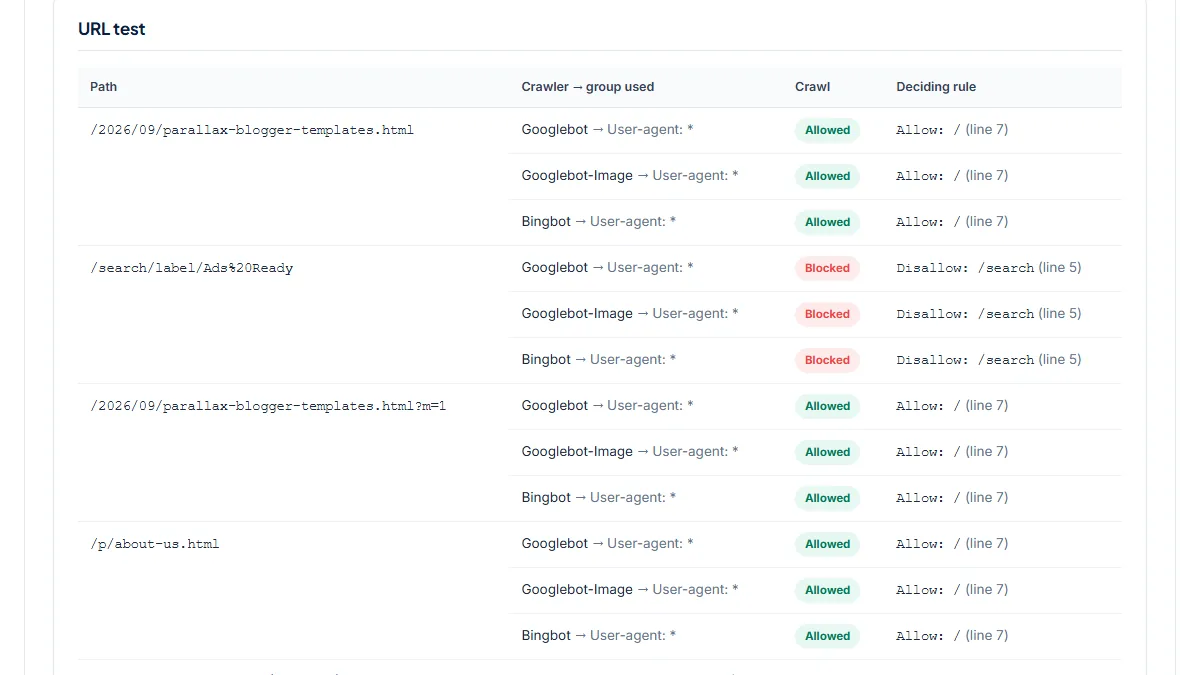
- Sora Templates sells Blogger themes from a Blogger blog on a custom domain, and it serves the untouched default robots.txt. On 25 October 2026 we tested a September 2026 post, a label page, the mobile view of the post and the About page.
- Input
https://www.soratemplates.com/2026/09/parallax-blogger-templates.html, paths/search/label/Ads%20Ready,…templates.html?m=1,/p/about-us.html- Reading the result
- Two groups:
Mediapartners-Googlewith an empty Disallow (the AdSense crawler may fetch everything), and*withDisallow: /search,Disallow: /share-widget,Allow: /. Googlebot, Googlebot-Image and Bingbot all fall back to*. The post, its?m=1version and the About page are Allowed byAllow: /(line 7); the label page is Blocked byDisallow: /search(line 5). This is the baseline: if your custom file blocks more than this, you should know why.
2. Custom file opens /search, noindex keeps it out of results
- Situation
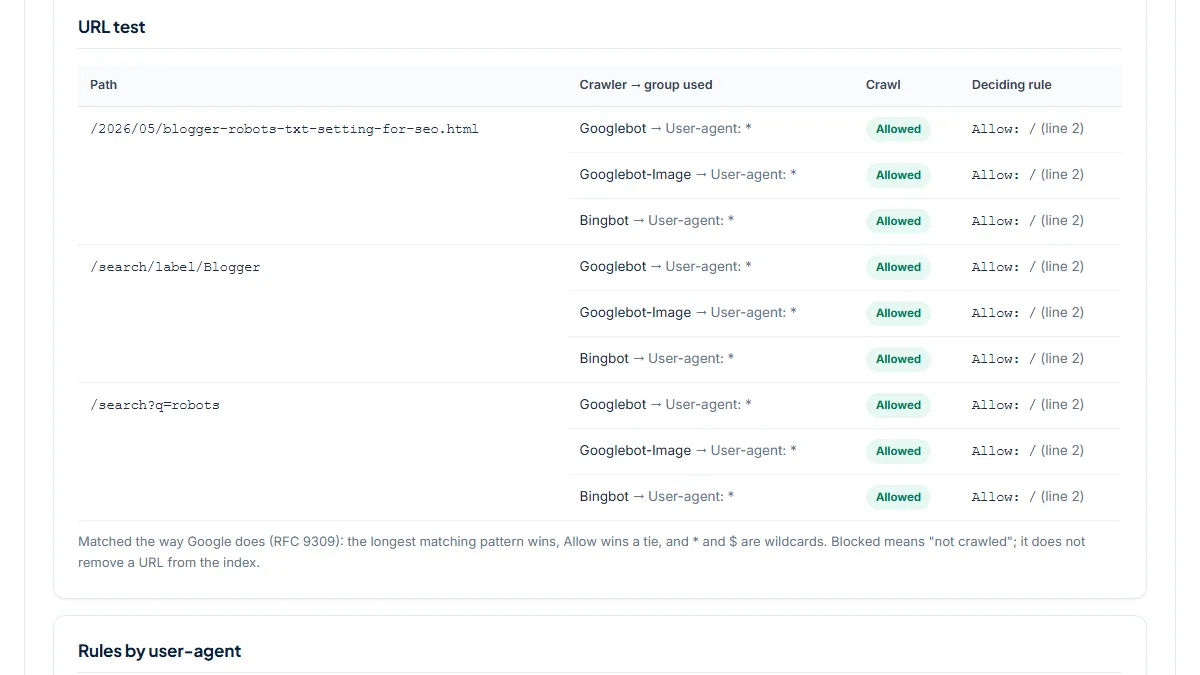
- Sahil Dubey's blog runs on Blogger with a custom domain and a custom robots.txt of just two lines plus sitemaps. We tested one of its posts, a label page and a search URL, then fetched those two pages to read their robots meta tags.
- Input
https://www.sahildubey.com/2026/05/blogger-robots-txt-setting-for-seo.html, paths/search/label/Blogger,/search?q=robots- Reading the result
- One group,
User-agent: *with onlyAllow: /, so all three URLs are Allowed (line 2) and 0 Disallow rules remain: the default/searchblock is gone. Two sitemaps are declared:/sitemap.xmland anatom.xmlfeed of up to 500 posts. The label and search pages both serve anoindex, followrobots meta tag. Google can crawl them and follow their links to posts, and the noindex keeps them out of results. This is the consistent alternative to blocking.
3. A narrower rule: search results blocked, label pages indexable
- Situation
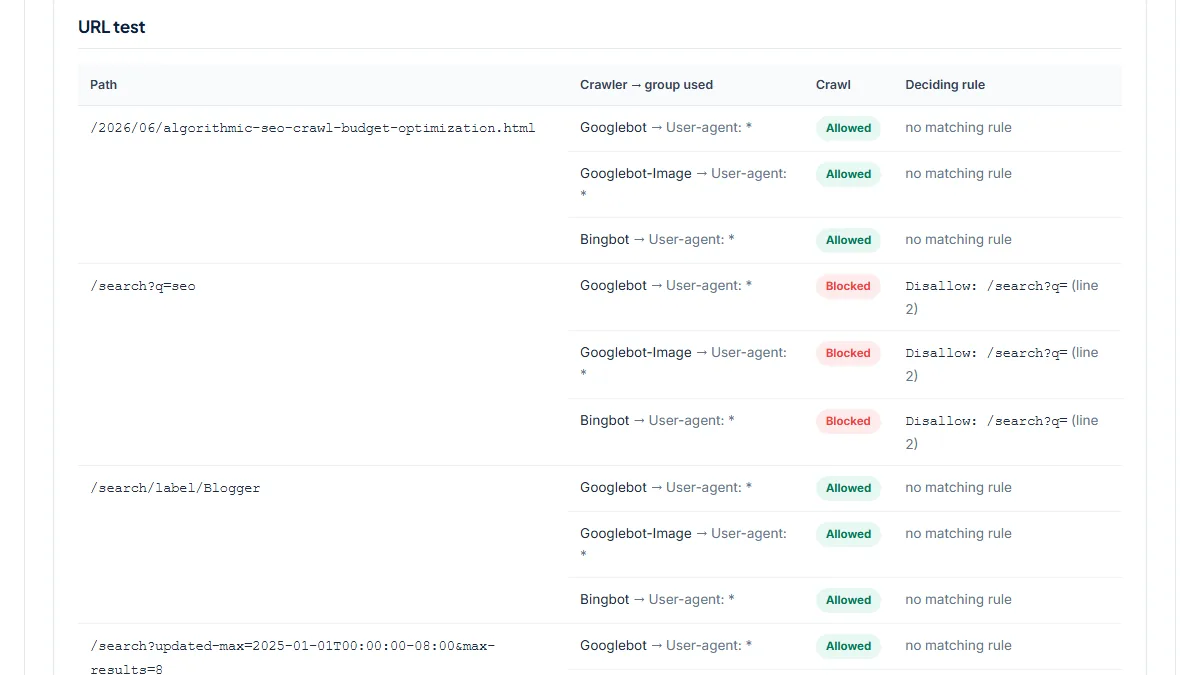
- BloggerSpice, a Blogger blog about blogging, replaced the default file with a single rule. We tested a June 2026 post, a search, a label page and an "Older posts" pagination URL.
- Input
https://www.bloggerspice.com/2026/06/algorithmic-seo-crawl-budget-optimization.html, paths/search?q=seo,/search/label/Blogger,/search?updated-max=…&max-results=8- Reading the result
- One group with
Disallow: /search?q=. Only the search result is Blocked; the post, the label page and the pagination URL are Allowed with no matching rule, and the label page itself servesindex, follow. That is a deliberate choice to let label pages rank, and it also opens everyupdated-maxpage to crawling. The Sitemap line points tobloggerspice.comwhile the blog lives onwww; Blogger redirects the naked domain, but listing thewwwURL saves crawlers the extra hop.
Common mistakes
- Pasting a custom robots.txt from a tutorial without testing your own post URLs first. Rules like
Disallow: /20orDisallow: /*.htmllook harmless and can block every post. - Leaving out the Sitemap line when writing your own file. The custom text replaces the default entirely, so the sitemap reference disappears with it.
- Blocking label or search pages in robots.txt and also setting noindex on them. Google never fetches a blocked page, so it never reads the noindex.
- Using robots.txt to hide a post you want out of Google. Blocking stops crawling, not indexing; use the post's own "No index" custom robots tag instead.
- Copying a file written for WordPress, with lines like
Disallow: /wp-admin/or/feed/. Those paths don't exist on Blogger, and the rules you actually need, such as the /search decision, are missing.
Frequently asked questions
Search Console says my label pages are "Blocked by robots.txt". Is that a problem?
Not on the default settings. Blogger's own robots.txt disallows /search, and label pages live under /search/label/, so that status is the file doing its job. Your posts are what matter: run one here and it should show Allowed. Only act if you want label pages in Google, in which case remove the /search block and decide with custom robots header tags whether they get indexed.
Should I enable custom robots.txt on Blogger at all?
Only if you have a reason the default doesn't cover. The default already allows posts and pages, blocks search and label pages, and lists your sitemap. Blogger's help says the custom text is used instead of the default, so you take over every line. If you do enable it, start from the default text, change one line at a time and test your post URLs here after each save.
My new posts aren't being indexed. Could robots.txt be the reason?
It can be, and it is the quickest cause to rule out. Run a new post URL here: if Googlebot shows Allowed, robots.txt isn't blocking it. Then look elsewhere: the post's custom robots tags, the Page indexing report and URL Inspection in Search Console, and Crawl Stats. Bloggers on custom domains have reported slow indexing before, and Google's John Mueller pointed them to Crawl Stats.
Does the ?m=1 mobile URL need its own rule?
No. Blogger adds ?m=1 for the mobile view, and the post page carries a canonical tag that points to the URL without the parameter, so Google folds the two together. Blocking ?m=1 in robots.txt only hides that canonical from Googlebot. On the default file the parameter version is allowed; test it here with your own post to see that your custom file treats it the same.
What is the Mediapartners-Google group in my robots.txt?
That is the AdSense crawler. Blogger's default gives it an empty Disallow, meaning it may fetch every page, so ads can match your content even on pages other bots are kept out of. Its group is separate: Googlebot, which handles search, does not use it and follows the * group. If you write a custom file and show AdSense ads, keep that group in it.
Reference: Blogger Help's blog settings guide states that custom robots.txt content is used instead of the default file served to search engines, and that blogs can't be hosted on naked domains.