Why Affiliate Marketers need this
An affiliate site grows by adding pages around the same products: a best-of list, a budget edition of it, a single review of each pick, then a versus page. Each one is written to earn from a slightly different search, and each one names the same products. A year or two later nobody remembers which page was meant to answer which query, and two of them start trading places in the results.
Google's reviews system mostly judges review content page by page, so every page needs a job of its own. A quick way to see whether your pages still have separate jobs is to compare what they announce: the title, the H1 and the words they use most.
This tool does that for up to 10 URLs at once. It scores every pair, marks pairs at 55% or more as high risk and lists the words both pages lean on. It reads your pages and nothing else. It has no idea which queries they rank for, so a flagged pair is a reason to open Search Console, not a verdict.
Affiliate Marketers specific guidance
Tips for Affiliate Marketers
Build the list around one product group, not the whole site. Put the main best-of list first, then every narrower list in the group (budget, lightweight, for men, for women), then the single reviews of the top picks and any versus page. Six URLs already give 15 pairs, and ten is the limit.
Read the table from the top. Each row shows the pair, its Overlap score and Title / Terms, the two parts you can act on. The score is 45% title words, 20% H1 words and 35% the 20 most frequent words of the main content. "Best", the year and a site name that closes every title are ignored, and "tents" counts as "tent". A high Title figure means two pages announce the same thing. A high Terms figure under a low Title figure means the bodies cover the same ground under different headlines.
On a review site the rows usually fall into three bands. A best-of list against a single review is low, because one title names a category and the other a product. Two reviews built on one template often sit in the 30s: they share the word "Review" and the vocabulary of the category. Two lists of one group are where the red rows appear. For each red or amber pair, write one line saying which search each page is for. If the two lines are the same, merge the pages or redirect one. If they differ, make the titles and H1s say the difference, then check in Search Console whether one query really shows both URLs.
The costliest mistake
The usual mistake is to read the result as a ranking report. The checker never sees Google; it compares wording. A green row between your list and a review does not prove Google never swaps them for a "product name review" search, and a red row between a general list and its women's edition can be two pages doing two jobs well.
Quick start
- Pick one product group on your site.
- Paste its lists, top reviews and versus pages, one URL per line.
- Note every red and amber row and its Title / Terms figures.
- Write the one search each flagged page is for.
- Confirm in Search Console, then merge or reword and run the check again.
What this tool does not tell you
- It has no Search Console or ranking data and no keyword field. It cannot tell you which queries two pages share, or whether Google ever shows both.
- It compares single words, not phrases or intent. "Review" and "best" searches are a difference it cannot see, and "best" itself is ignored in titles.
- It does not crawl. You choose the URLs, 10 at most, and it does not read canonical tags, noindex or the links between the pages.
- It fetches plain HTML as a bot. A page that blocks bots, returns an error or redirects to another URL in your list is left out, and a "Left out of the comparison" notice names it.
Real examples
1. Two tent lists and four reviews on a gear-testing site: nothing flagged
- Situation
- A large outdoor gear site keeps a best backpacking tents list, a best ultralight tents list and a full review of every tent in them. We pasted the two lists and four single reviews on 12 November 2026.
- Input
- Six URLs of one site:
/best-backpacking-tent,/best-ultralight-tentand four single tent reviews - Reading the result
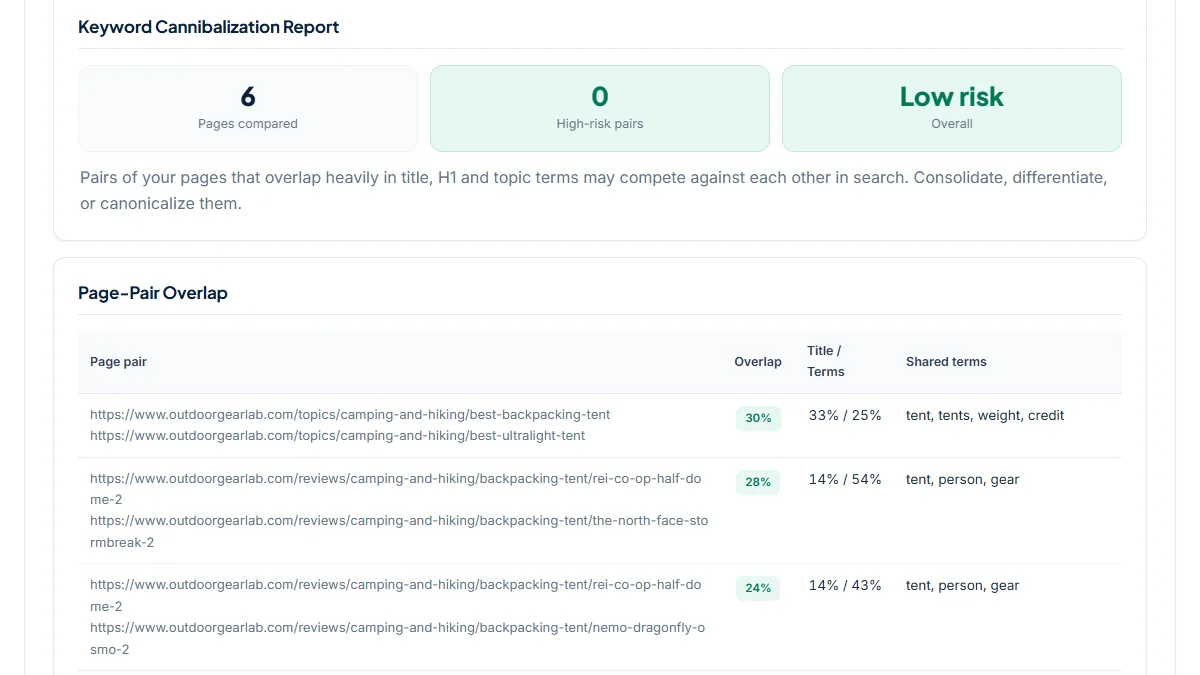
- 6 Pages compared, 0 High-risk pairs, Overall Low risk. The closest pair was the two lists at 30% (Title 33% / Terms 25%): "backpacking" against "ultralight" is enough to keep the titles apart. Review against review scored 19% to 28%, with shared terms such as "tent", "person" and "gear". All eight list-against-review pairs scored 6% to 15% with Title at 0%, because a review title names a product and a list title names a category. This is what clearly separated pages look like in the tool. Whether a list outranks its own review for a product search is something only Search Console can show.
2. Running shoe guides: a general list next to its men's and women's editions
- Situation
- A shoe-testing site publishes a best running shoes guide, an edition for men, an edition for women and a lab review of each shoe. Same day: the three guides and three single reviews.
- Input
- Six URLs of one site: three
/guides/best-…-running-shoespages and three single shoe reviews - Reading the result
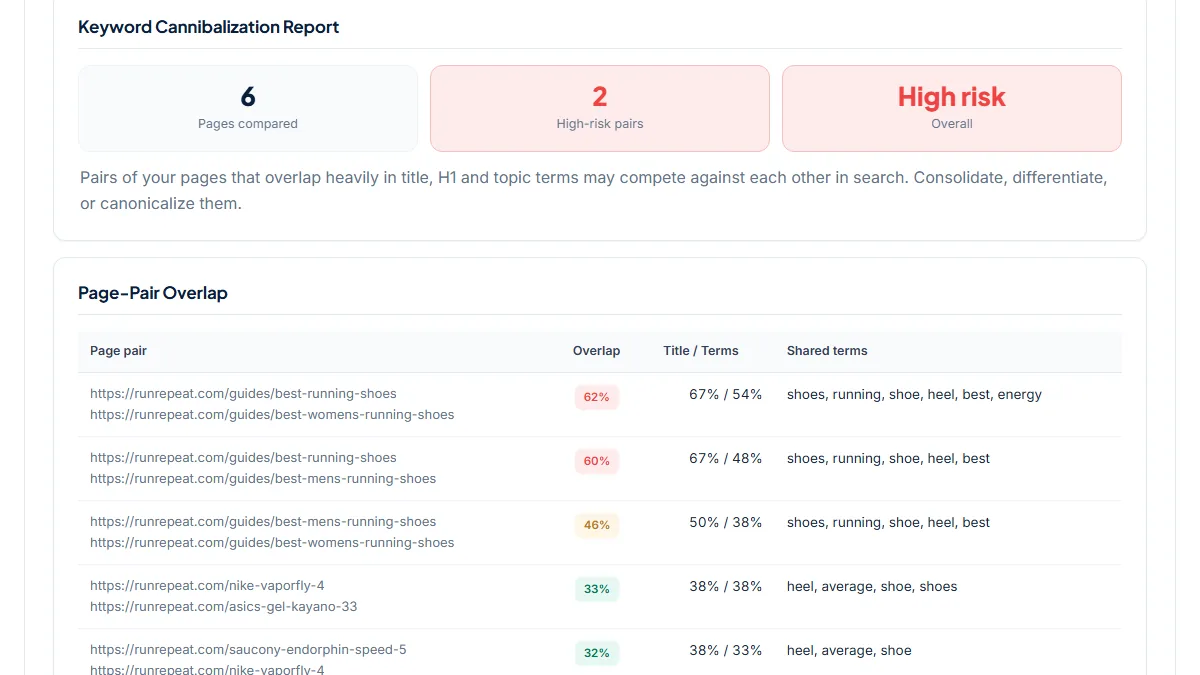
- Overall High risk with 2 High-risk pairs, both between guides: general against women's 62% (67% / 54%) and general against men's 60% (67% / 48%). Men's against women's was amber at 46%. The three reviews scored 31% to 33% against each other, because their titles open with the same fixed phrase and end in "Review". Guide against review stayed at 6% to 9%. Splitting a list by audience is a deliberate choice, and the score does not say it is wrong. It says the general guide's title holds no word that the two editions lack, so the thing to look up is whether "running shoes for women" searches show one URL or two.
3. Three tent lists on one site, plus two reviews from the same brand
- Situation
- An outdoor gear site has a best backpacking tents list, a budget list and an ultralight list. We added three single reviews, two of them of different tents from one brand. Same day.
- Input
- Six URLs of one site:
/best-backpacking-tents, the budget and ultralight lists and three…-reviewpages - Reading the result
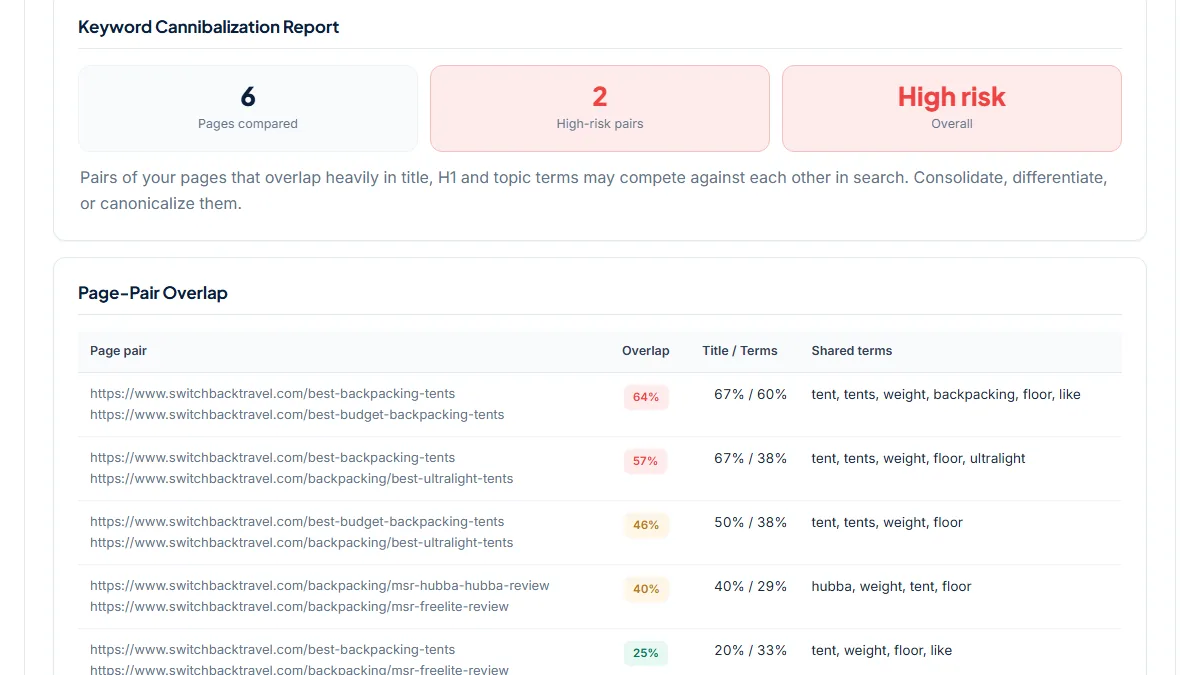
- 2 High-risk pairs: main list against budget list 64% (Title 67% / Terms 60%) and main list against ultralight list 57% (67% / 38%). Budget against ultralight was 46%. The 60% Terms figure is the one to act on: the main and budget lists share "tent", "tents", "weight", "backpacking" and "floor" among their most frequent words, so the bodies read alike as well as the titles. The two same-brand reviews came out amber at 40%. They share the brand and "Review" in the title, and one review mentions the other tent often enough for its name to appear in both term lists. List against review was 10% to 25%.
Common mistakes
- Pasting only the two pages you already suspect. Add the narrower lists and the single reviews of the same group; the pair you did not think of is often the top row.
- Reading Low risk as "these pages do not compete". The tool compares titles, H1s and frequent words. Only Search Console shows two of your URLs on one query.
- Merging two lists because their row is red. A general list and a budget list can both earn their place. Check first whether one query brings impressions to both.
- Fixing a pair by rewording the title only. If the Terms figure stays high, the two bodies still cover the same picks in the same words.
- Mixing in a competitor's page. The tool does not check that the URLs belong to one site and scores the pair anyway, which is a comparison, not cannibalization.
Frequently asked questions
Do a best-of list and a single review of one of its products cannibalize each other?
Sometimes, and wording alone will not show it. The two usually serve different searches: a category search wants a comparison, a product review search wants depth on one item. In our three runs every list-against-review pair scored 25% or less. The conflict is real when the list is what Google shows for the product's review search, or the review for the category search. Look it up in Search Console: filter Performance by the query and open the Pages tab. If both URLs get impressions there, the pages need clearer separate jobs.
What does a 55% overlap actually mean?
The score blends three comparisons: 45% comes from shared title words, 20% from shared H1 words and 35% from shared words among each page's 20 most frequent terms. At 55% or more the row turns red and counts as a High-risk pair. From 35% to 54% it is amber, and below that green. Two titles that differ by one word, such as a list and its budget edition, already reach 67% on the title part. The figure measures how alike two pages are worded. It is not a share of traffic or of keywords.
Two of my lists are flagged. Should I merge them?
Not on the score alone. Write down the one search each list is for. If both lines say the same thing, merge: keep the URL with more links and impressions, move the best content into it and 301 redirect the other. If the lines differ, say overall picks against budget picks, keep both and make the difference visible in the title, the H1, the picks and the opening paragraph. Then link each list to the other with anchor text that names the difference, and run the check again to see whether the Title figure has dropped.
Why do my single reviews score 30% to 40% against each other when the products differ?
Because they share a template. Every review title carries the word "Review", often a fixed opening phrase too, and the bodies use the same test vocabulary. On the shoe-testing site in our second example, three reviews of different shoes scored 31% to 33% against each other. Treat that band as your site's baseline, not as a problem. What deserves a look is a review pair well above the baseline, for example last year's model and this year's model of one product, where the titles differ by a single number that the tool ignores.
Reference: Google's page on its reviews system says the system primarily evaluates review content on a page-level basis, and that on sites with a substantial amount of review content any content within the site might be evaluated. That is why each list and each review should have a job of its own.