Why Affiliate Marketers need this
An affiliate roundup earns from the moment it is published until the products in it stop being sold, and nobody tells you when that happens. The tent is replaced by next year's model, the store drops the line, the network moves the program, and the "Check price" button keeps sitting in your top pick. A reader who clicks it lands on an error page or a search page, and the commission is gone.
This checker reads one page, follows every link the way a click would, through amzn.to, pxf.io, sjv.io or AvantLink redirects, and reports where each one ends: OK, broken (404, 410, server errors, dead hosts) or blocked (the store refused an automated request). That is the quick part of a roundup refresh.
The harder part is what it cannot see. A product page that says "no longer available" usually still answers 200, so it shows as OK. On the real roundups below, Amazon answered 200 even for a product number that does not exist. Treat the result as the dead-link list plus a shortlist of links to open yourself.
Affiliate Marketers specific guidance
Pick the roundup, then mind the 50-link window
Start with roundups that still get clicks and were written more than a year ago: "best of" lists for gear that gets a new model every season go stale first. Each run covers one URL and does not crawl, so a list of your ten earning roundups is ten runs.
Only the first 50 unique links are checked, in the order they appear in the HTML. On the outdoor roundup below, the first merchant link was link 24; on the espresso roundup it was link 37. Menus, category links and social icons come first. A long roundup therefore leaves merchant links unchecked: 15 of them on the tent page. If your product table comes late in the HTML, the run covers the top of the list only. That is usually your best-earning part, but not the whole page.
Reading merchant links: Broken, Blocked and the 200 that misleads
Every link is followed through up to five redirects and only the final status is shown. A tracking link that ends on a live product page reads 200; one that ends on a removed page reads 404. You do not see the hops, so use the Redirect Checker on one link if you need to know where a network link sends readers.
Read Broken links to fix first. Then read Blocked: open these by hand. Many large stores sit behind bot protection and answer 403 to any server, even when the page works in your browser, and a site can answer 429 when a burst of requests hits it at once. Those rows are not dead links. Open each one in a private window.
Two traps run the other way. A store can block with a 404: before you drop a merchant, open its home page and see whether that loads. And a removed product can answer 200: Amazon sends unknown product numbers to a landing page with status 200, and "Currently unavailable" pages also answer 200. For your top picks, open the Amazon links yourself.
Fix order for an old roundup
Fix real 404s on your top picks first, since those cost the most clicks. If the product is gone for good, rewrite the pick around its successor or the next-best product you have tested, not only the URL. If one store dropped it but another still sells it, point the button there; a roundup that links to more than one seller survives a single store's cleanup. Rescan after saving, then work through the Blocked list by hand.
What this tool does not tell you
- It reads status codes, not page text, so "out of stock", "no longer available" and product-less landing pages that answer 200 count as OK.
- It cannot see past a store's bot protection. Blocked rows stay unverified until you open them yourself.
- It does not check whether your affiliate tag or tracking ID survives the redirects, or whether a click is credited.
- One page per run and the first 50 unique links only; no site crawl and no history of earlier runs.
Real examples
1. Camping tent roundup: one real 404 that was a store block, six REI links blocked
- Situation
- A large gear-testing site's "best camping tent" roundup with REI, Backcountry and Amazon buttons. We ran it on 10 November 2026.
- Input
https://www.outdoorgearlab.com/topics/camping-and-hiking/best-camping-tent- Reading the result
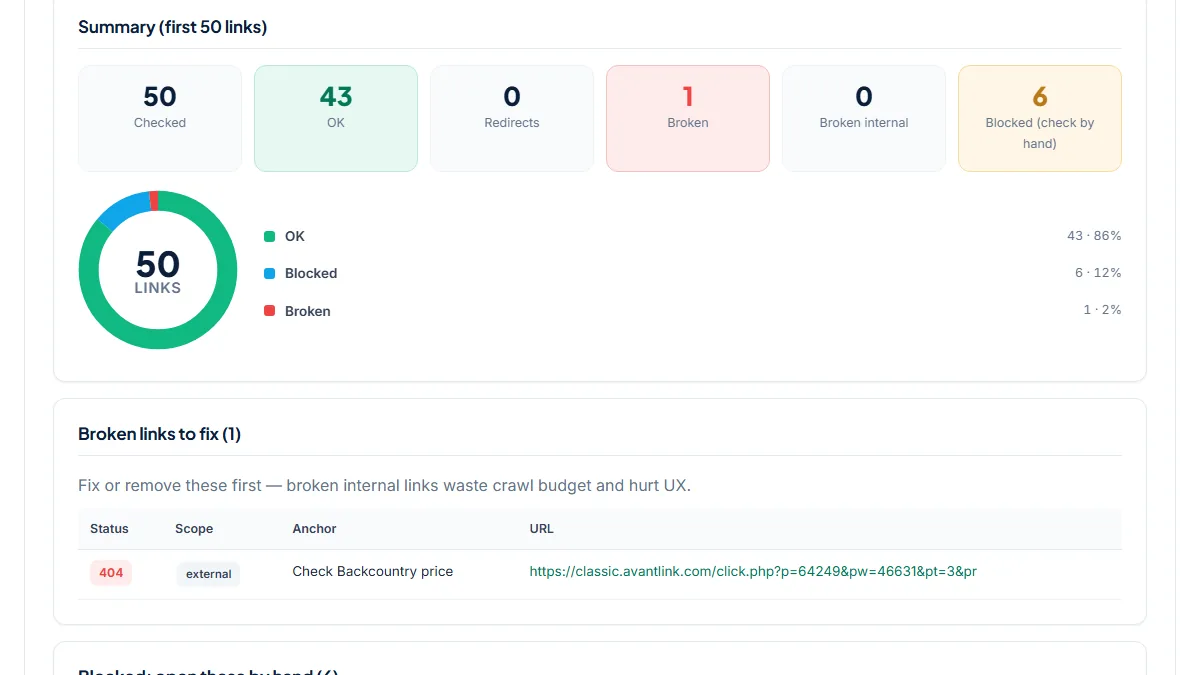
- The page has 126 unique links; the first 50 were checked: 43 OK, 1 Broken, 6 Blocked (check by hand). All six blocked rows are "Check REI price" links that pass through rei.pxf.io and end on rei.com with 403. The Broken row is "Check Backcountry price": an AvantLink click that ends with 404 on a backcountry.com product page after four redirects. That looks like a discontinued tent, but our follow-up request to backcountry.com's home page got the same empty 404, so the store was blocking the server, not proving the tent gone. The four Amazon links read 200. The first merchant link was link 24, and 15 merchant links came after link 50 and were not checked.
2. Espresso machine roundup: clean apart from three blocked store links
- Situation
- A coffee site's "best espresso machines" roundup that links to Amazon and five specialty stores. Same day.
- Input
https://www.homegrounds.co/best-espresso-machines/- Reading the result
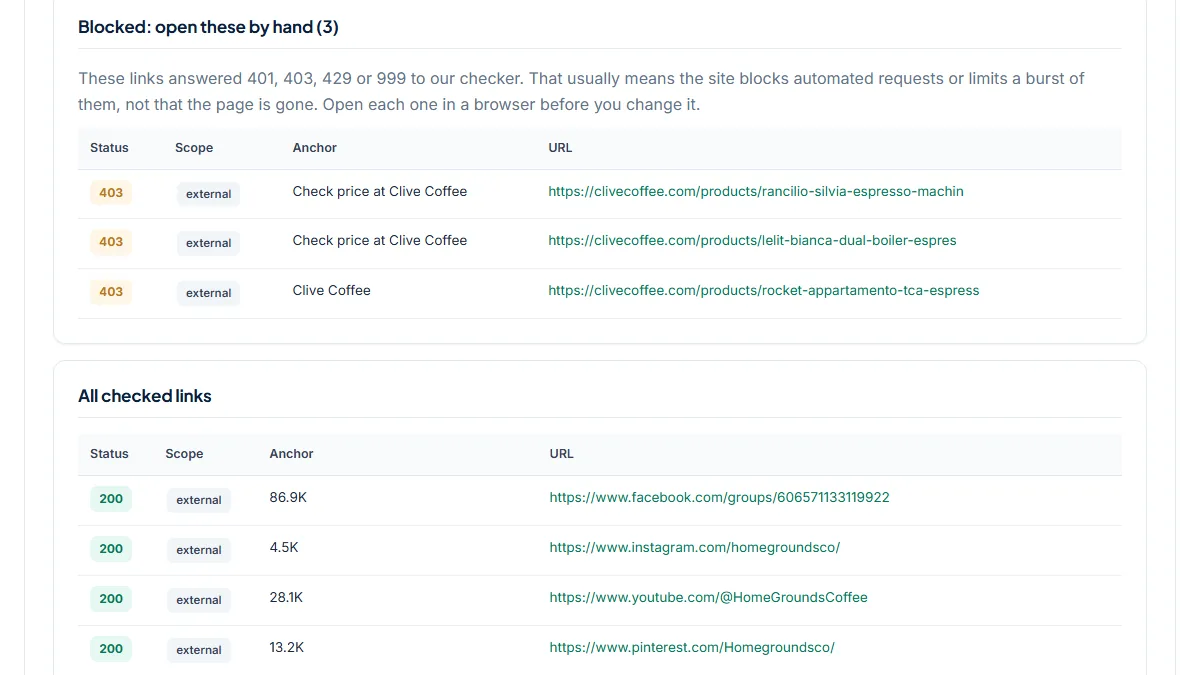
- 91 unique links, 50 checked: 47 OK, 0 Broken, 3 Blocked. The three blocked rows are Clive Coffee product links with 403. A plain command-line request to the same Clive Coffee URL from the same server answered 200, so the block depends on how the request looks, not on the product. Short tracking links (coffeebros.sjv.io, a Seattle Coffee Gear pxf.io link) and four Amazon product links all ended on 200. Before the fix shipped with this page, these three 403s were counted as Broken and listed as links to remove. Five merchant links sat after link 50 and were not checked.
3. 2023 budget audio picks: nine amzn.to links all OK, three worth opening
- Situation
- An audio blog's January 2024 post of its favourite budget gear from 2023, with nine amzn.to short links. Same day.
- Input
https://hifitrends.com/2024/01/01/upgrade-your-audio-on-a-budget-our-top-audiophile-gear-picks-from-2023/- Reading the result
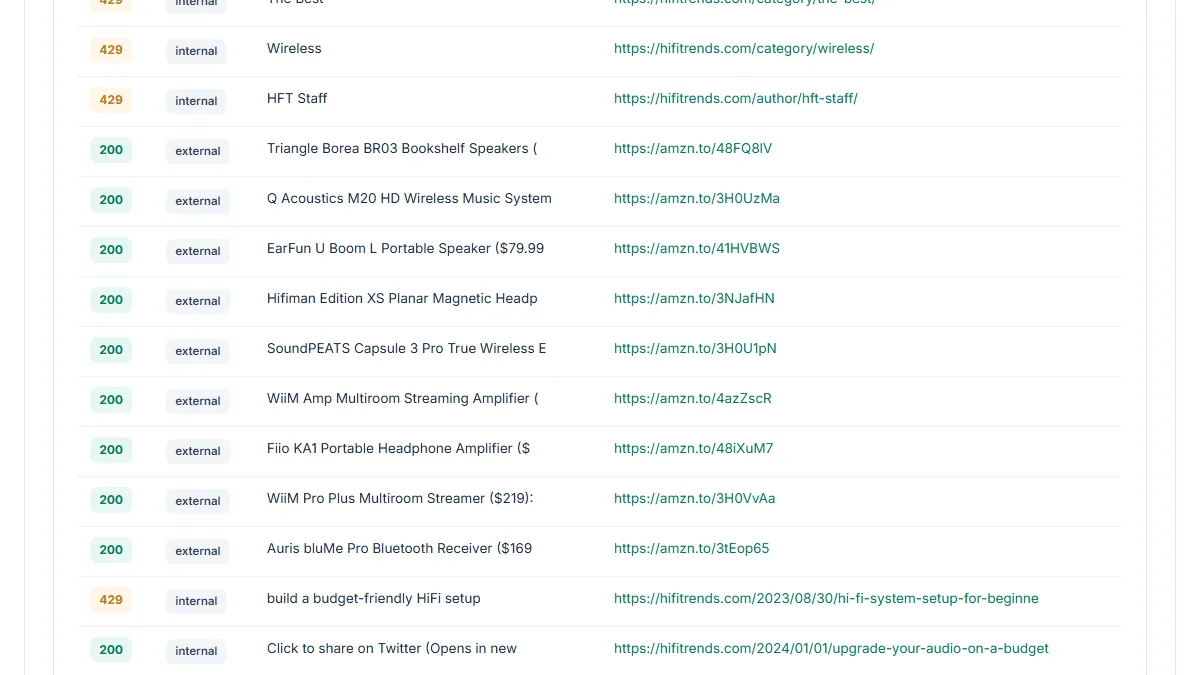
- 56 unique links, 50 checked: 32 OK, 0 Broken, 18 Blocked, all of them the blog's own category and menu links answering 429: the site rate-limited the burst of checks. All nine amzn.to links read 200. We then followed each one ourselves: six reached named Amazon product pages, one of which contained the words "Currently unavailable", and three (the EarFun speaker, the SoundPEATS earbuds and the WiiM Pro Plus streamer) ended on an Amazon landing page with no product title, the same page our request for the made-up product number B000000000 got. The tool cannot tell those three apart from a live listing; only opening them can.
Common mistakes
- Deleting a merchant button because it shows 403 or 429. Those rows are under Blocked for a reason: open them in a browser first, they usually work.
- Trusting a 404 from a big store without opening its home page. A store that blocks servers can answer 404 to everything, home page included.
- Reading 200 on an Amazon or amzn.to link as "the product is still for sale". Removed and unavailable products answer 200 too.
- Assuming a clean run covered the whole roundup. Only the first 50 links are checked, and menus use part of them, so the bottom of a long list can be untested.
- Swapping the URL but keeping the old pick. If the product is discontinued, the review text and the "best" claim need updating, not only the link.
Frequently asked questions
Why are my REI or other store links listed as Blocked instead of OK?
Because the store answered our server with 403 (forbidden) or 429 (too many requests). Many large retailers sit behind bot protection that refuses automated requests even when the page loads fine in a browser, and that block does not change with a browser-like user agent. The tool cannot tell a block from a deleted page, so it lists those rows separately instead of calling them broken. Open each one in a private window; if the product page loads, the link is fine.
Will it tell me an Amazon product has been discontinued?
No. Amazon answers 200 for removed products and even for product numbers that never existed, so an Amazon link cannot show as Broken here. In our run, three of nine amzn.to links ended on a landing page without a product title, the same page a made-up product number gets, and the tool still showed 200 for all nine. For the products that earn most, open the Amazon links yourself and check that the listing still has a buy button.
Does it work with amzn.to, network tracking links and cloaked /go/ links?
Yes. Every link is followed through up to five redirects and the final status is shown, so amzn.to, Impact pxf.io, sjv.io and AvantLink links are judged by the page they end on. A cloaked link on your own domain, such as /go/tent-name, is listed as internal because it starts on your site, even though it ends at the store. A chain longer than five hops is not followed to the end and is counted under Redirects.
What should I do when a top pick's merchant link is really dead?
First check whether the product is gone or only gone from that store. If another store still sells it, point the button there and consider listing two sellers for each pick, so one store's cleanup does not break the page. If the product is discontinued everywhere, update the pick itself: name its successor or the next product you have tested, and change the text that recommends it. Then rescan the page to confirm the Broken count.
Reference: Google's guide on writing high quality reviews suggests including links to multiple sellers so readers can buy from the merchant they choose, which also keeps a roundup useful when one store drops a product.