Why SaaS Marketers need this
A common SaaS SEO mistake is mapping a feature page to a keyword that Google answers with guides. The page is accurate and well built, but the searcher wanted to learn something, so the results are full of articles and the feature page never reaches page one. Hallam's SaaS guide warns against trying to rank a product page when the results are entirely informational. The opposite also happens: a team writes another top-of-funnel article that brings visits but few trials.
This tool gives you a quick first read before the page type is decided. It labels the keyword Informational, Commercial, Transactional or Navigational from the words in it, names a funnel stage and the content type that usually fits, and colours up to 15 live Google autocomplete suggestions by their own intent. It does not open Google's results page, so it cannot tell you what actually ranks. Use it to sort a keyword list fast, then check the few keywords you will build pages for with a real search.
SaaS Marketers specific guidance
Read the label as a reading of the words
The primary intent comes from short word lists, checked in a fixed order: Transactional first (buy, price, pricing, cost, subscription, deal), then Commercial (best, top, vs, review, alternative, software, tool), then Navigational (login, app, dashboard, download), then Informational (how, what, why, guide, example, tutorial). The first list with a match wins, so "best way to write a project plan" is Commercial because of "best". A keyword with none of these words is Informational by default and shows Detected modifiers: none. Treat that case as "unknown", not as "informational". Also note that "app" counts as Navigational, so "invoicing app" gets the Homepage, login or dedicated brand page advice even though no brand is named.
Let the related queries pick the page type
The Related Queries & Their Intent block is the most useful part for page planning. Each chip is a real autocomplete suggestion, coloured by its own label; hover a chip to see the label. Count the colours. If nearly every chip is Commercial, searchers are comparing options and the page that fits is a category or "best of" style page. If most are Informational, the keyword belongs to the blog. Then read the words: "template", "example" and "maker" point to a free template or a small tool page that can sit between a guide and your product.
Confirm with one search before the brief
The Likely SERP features and Best content type rows are fixed text for each intent; they do not come from Google. So the last step is yours. Search the keyword in a private window, set to your main market, and sort the first ten results into three groups: guides and blog posts, review sites and listicles (G2, Capterra, "best X" articles), and vendor feature or product pages. If most results are guides, write a guide and link from it to the feature page. If review sites dominate, plan a comparison or alternatives page and a review profile. Give a feature page a keyword only when other vendors' feature pages already rank for it.
What this tool does not tell you
- It does not open Google's results page, so it cannot show which page types rank, whether G2 or Capterra are there, or what features appear. A manual search is the only check.
- The intent label depends only on the words in the keyword and a fixed order of word lists. A keyword with none of them is Informational by default, and "app" always reads as Navigational.
- It gives no search volume, difficulty or traffic. Autocomplete shows what people type, not how many people type it.
- There is no country setting. Suggestions come in the page language without a country, so a suggestion in another language can appear.
Real examples
1. How to write a project brief: a blog keyword with a template inside it
- Situation
- A project management SaaS has a "project briefs" feature and the team wants a keyword for its page. We ran the phrase on 8 November 2026.
- Input
how to write a project brief- Reading the result
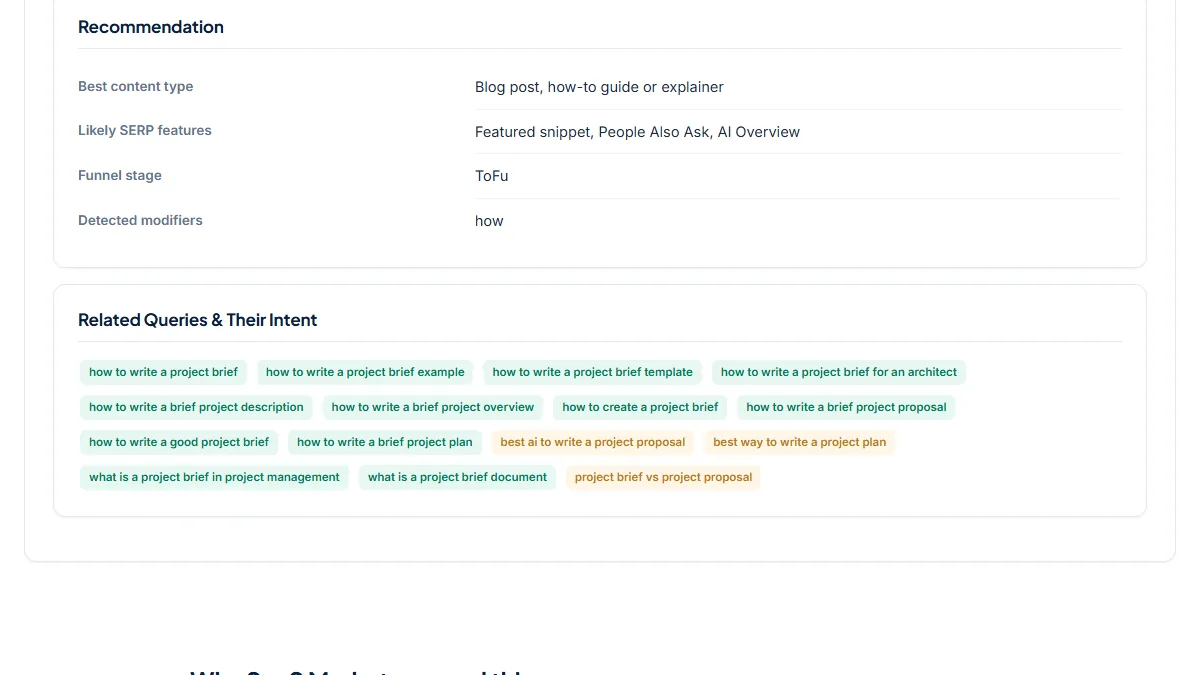
- Informational, funnel stage ToFu, Detected modifiers "how", Best content type "Blog post, how-to guide or explainer". Of the 15 related queries, 12 are Informational ("... example", "... template", "what is a project brief document") and 3 are Commercial ("best ai to write a project proposal", "best way to write a project plan", "project brief vs project proposal"). The feature page is the wrong target for this keyword. A guide that includes a downloadable brief template fits the searcher, and the template is the natural place to link to the feature.
2. Project management software: a commercial head term
- Situation
- The same team considers the head term for its main product page. Same day, same settings.
- Input
project management software- Reading the result
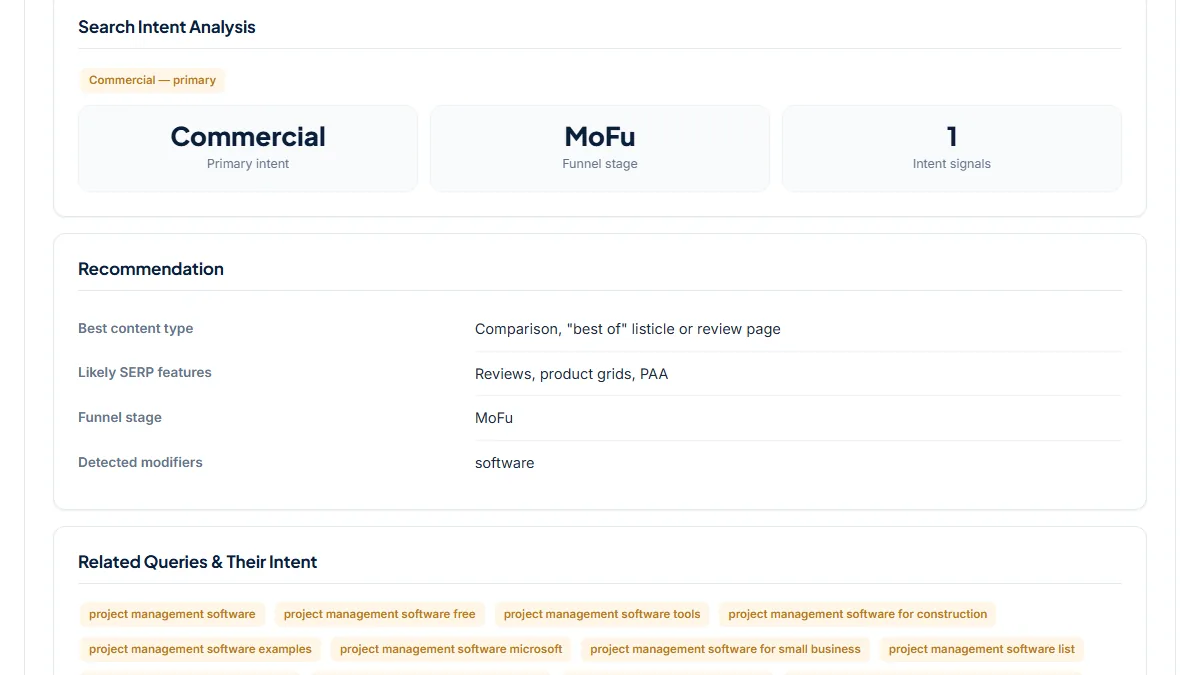
- Commercial, funnel stage MoFu, Detected modifiers "software", Best content type "Comparison, "best of" listicle or review page". All 15 related queries are Commercial, among them "... for small business", "... list", "... free" and five that start with "best". The label says buyers are comparing, and it says that only because the word "software" is in the list. It cannot show who ranks. This is the kind of head term where Hallam notes that review and aggregator sites crowd the results, so the manual search decides between a product page and a "best project management software" comparison.
3. Gantt chart: Informational by default, mixed in the suggestions
- Situation
- A product marketer wants a keyword for the Gantt view feature page. Same day.
- Input
gantt chart- Reading the result
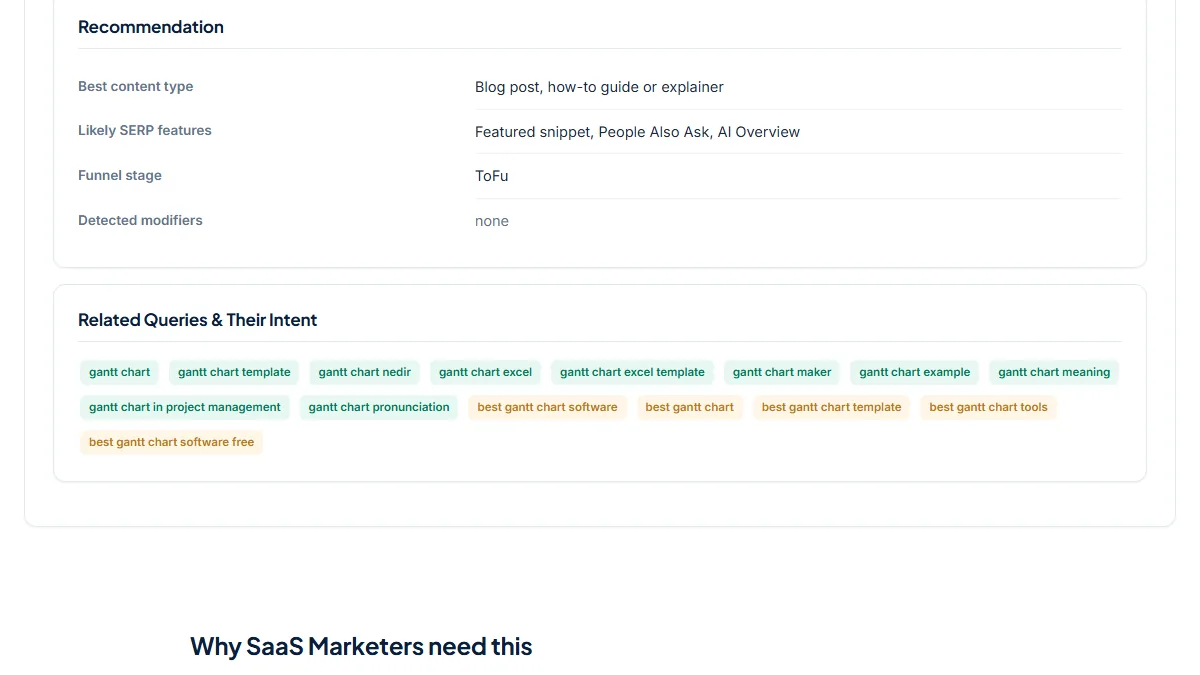
- Informational, ToFu, Detected modifiers none: no listed word is in the phrase, so the label is the default. The related queries tell more: 10 Informational ("template", "excel", "meaning", "pronunciation", "maker") and 5 Commercial ("best gantt chart software", "best gantt chart tools"). One suggestion came back in Turkish ("gantt chart nedir"), since the request has no country. The plain term is mostly learning and templates, while "gantt chart software" is the buyer phrase to test for the feature page.
Common mistakes
- Reading "Informational" with Detected modifiers "none" as a verdict. It is the default for any keyword without a listed word, such as a feature name or a brand.
- Giving a feature page a keyword because it was labelled Commercial. "software" alone makes a keyword Commercial; the page type that ranks is still unknown until you search.
- Taking the Likely SERP features row as a forecast. It is the same text for every keyword with the same intent.
- Writing one more guide for every Informational keyword without a route to the product. Add a template, a calculator or an in-text link to the feature that solves the problem.
Frequently asked questions
Does the tool check what Google shows for my keyword?
No. It never loads Google's results page. The primary intent comes from the words in the keyword, and the related queries come from Google autocomplete, which shows what people type next, not what ranks. That makes it useful for a quick first sort of a keyword list. For the keywords you will build pages for, search each one in a private window and look at the page types in the top ten before you decide.
Why is a feature name like "gantt chart" labelled Informational?
Because Informational is the default when none of the listed words appear. "gantt chart" contains no word such as how, best, software or pricing, so Detected modifiers shows none and the label falls back to Informational. In that case read the related queries instead. In our run they were mostly templates and definitions, with five Commercial "best gantt chart software" style suggestions, which is the phrase worth testing for a feature page.
How should I read a Transactional label on a SaaS keyword?
For SaaS it usually means a pricing, plans or sign-up search. "trello pricing" is labelled Transactional with the modifier "pricing", funnel stage BoFu. The Best content type row, "Product, category, pricing or landing page", fits well. The Likely SERP features row names shopping ads and a local pack because it is written for shops, so ignore that part for software. Your pricing page is usually the right target for these keywords.
How is it different from the Search Intent Analysis tool?
Both use the same word lists for the main label. The Search Intent Analysis tool works in English only and adds a percentage split of live autocomplete variations by intent, which is a good second reading of a keyword. This analyzer adds a funnel stage, secondary intent signals when a keyword mixes intents, a Turkish version with Turkish word lists, and coloured related queries you can scan by eye.
Reference: Ahrefs' SaaS SEO guide sorts SaaS keywords into four page types, from blog posts and knowledge base pages to product landing pages and comparison pages, and notes that content which does not match the search intent has lower chances of ranking.