Why Shopify Store Owners need this
A Shopify catalog rarely breaks loudly. You install a reviews app, switch themes or let a developer tweak theme.liquid, and the storefront still looks fine. Shopify's own help center warns that custom code and apps can remove the title tag Online Store 2.0 themes print by default, and nobody opens the <head> to notice.
The slower leak is copy. Shopify has no title or description templates, so the "Search engine listing" fields get filled by hand, by a CSV import or not at all. Bundles and variant packs inherit a description written for a different product, blank fields fall back to the product body, and the admin preview shows only what you typed, never what the theme outputs.
The Meta Tag Analyzer fetches a live product or collection URL the way a crawler does. It reports the real title, meta description, canonical, meta robots, viewport and Open Graph tags, with character counts and a fix for each gap. "Add URL" puts three products side by side, so a copied description shows up as three identical lengths.
Shopify Store Owners specific guidance
Tips for Shopify Store Owners
Know which field feeds which tag. The product title becomes the H1; the page title under "Search engine listing" becomes the <title>. Shopify stores those SEO fields as the global.title_tag and global.description_tag metafields, which bulk editors and CSV apps write to, so spot-check a few products after every import instead of trusting the import log.
Most themes append – {Store name} to {{ page_title }}. Write titles without your brand and read the "Title length (30–60)" row: its count already includes the suffix. The title and description in Online Store › Preferences apply to the home page only; every product, collection, page and blog article needs its own listing, and the automatic /collections/all page has no listing until you create a collection with the handle all.
Products are shared in Facebook, Pinterest and WhatsApp, so treat the Open Graph group as part of the listing. Themes build og:image from the featured image; if the preview shows your logo, check that the URL starts with https:// and that only one og:image tag is printed.
Common mistakes
The typical failure is a fix made in the wrong layer. An SEO app injects a description through an app embed while the theme still prints {{ page_description }}, or a section file hard-codes a <title> that overrides the admin field on one template. The analyzer reads the first title and canonical in the served HTML, so if its value differs from what you typed, something downstream is writing over it.
Quick start
- Pick one live URL per template: home, product, collection, page and blog article.
- Paste the product URL above and run it.
- Read "Title & Description" first; red means a tag is missing.
- Open "Request Details" and confirm Meta robots is not
noindex. - Use "Add URL" to compare sibling products or the same template before and after an app install.
Real examples
1. Three snack packs serving one copied meta description
- Situation
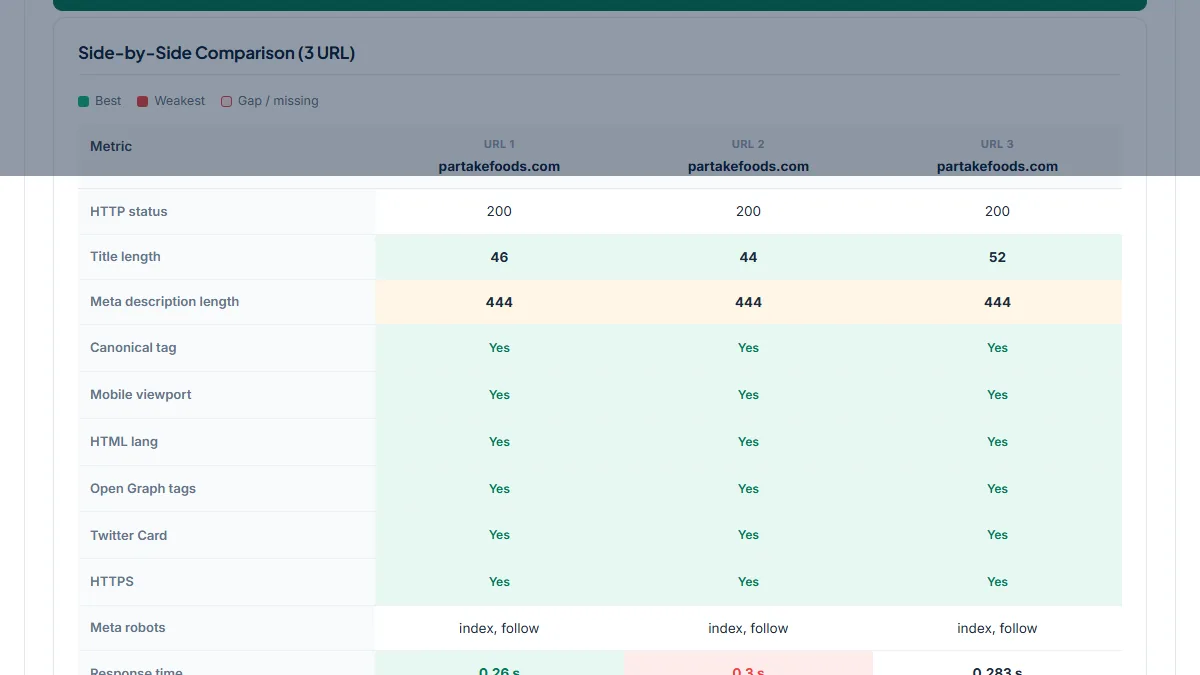
- Partake Foods sells several mini cookie variety packs. We compared three of them with "Add URL" on 22 October 2026 to see whether each pack has its own search snippet.
- Input
partakefoods.com/products/mini-chocolate-chip-grahams,…/mini-crunchy-chocolate-chipand…/mini-chocolate-chip-mini-confetti- Reading the result
- Titles differ (46, 44 and 52 characters, store suffix included) and all three canonicals are set, but "Meta description length" reads 444 · 444 · 444. Identical lengths on different products are the tell: all three serve the same paragraph written for the Crunchy Chocolate Chip Cookies, even the Chocolate Chip & Grahams pack. It is also almost three times the 160-character guide, so Google cuts it off or rewrites it. The fix is a unique 140–155 character "Search engine listing" description per pack.
2. The automatic "All products" collection with no description
- Situation
- Shopify creates
/collections/allfor every store, and it is often linked from the main menu. Same store, same day. - Input
https://partakefoods.com/collections/all- Reading the result
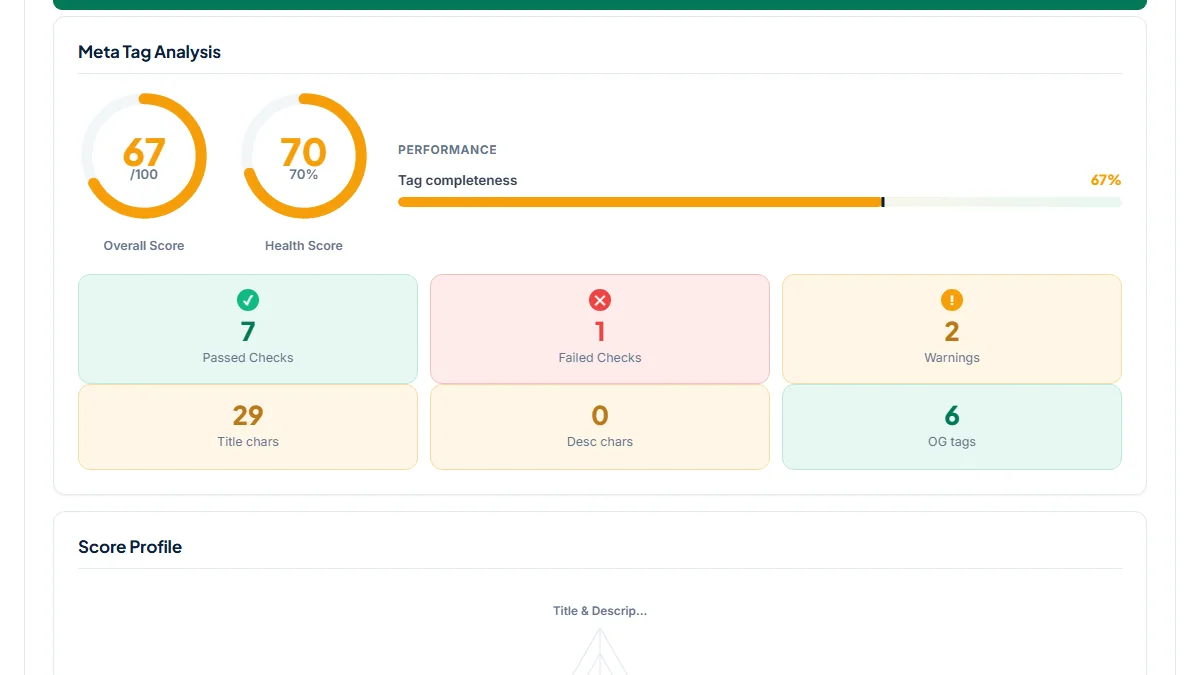
- Score 67/100. "Meta description present" is a critical fail (Missing) and the title "All Products – Partake Foods" is 29 characters, one under the range. The social preview shows the og:description borrowed from the home page and an
og:imagepointing at the logo overhttp://. The page has no listing fields to edit, which is exactly why it was missed: creating a collection with the handleallgives it a title and description you control.
3. A new limited-edition product launched with noindex
- Situation
- Death Wish Coffee published its Dark Spirits Chocolate Rum Ball coffee on 21 October 2026 as an early-access drop. We ran it the next day.
- Input
https://www.deathwishcoffee.com/products/dark-spirits-chocolate-rumball- Reading the result
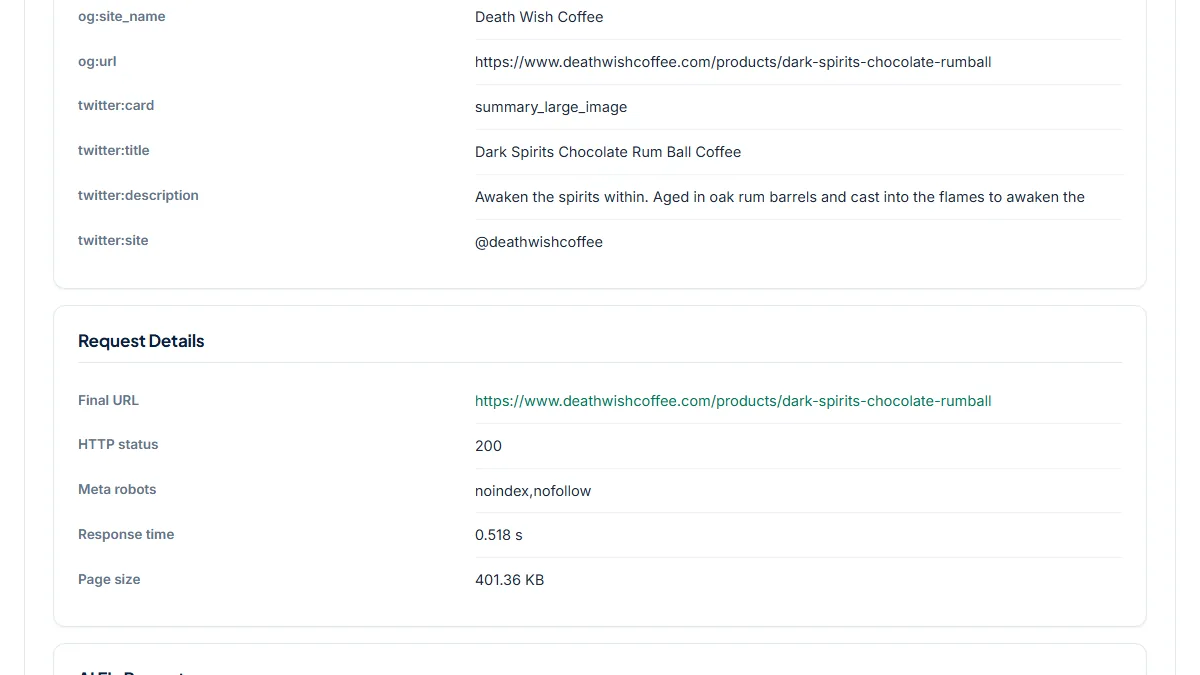
- Score 90/100 with a single warning (a 319-character description), yet "Request Details" shows Meta robots noindex,nofollow. The score measures tag completeness, not indexability, so always read that row. The image alt text says "Unlock early access", so the tag is probably deliberate for the members' window; the store's regular Power Surge Coffee page carries no robots tag. The job is to re-run this URL on public launch day and confirm the noindex is gone.
Common mistakes
- Leaving "Search engine listing" blank and assuming Shopify writes a good snippet. The fallback is the start of the product description, which often opens with shipping notes or a size chart.
- Pasting one description into every bundle, variant pack or colorway, so dozens of products share the same snippet. Compare three siblings with "Add URL": identical description lengths give it away.
- Hiding early-access, wholesale or pre-order products with
noindexand forgetting to remove it at public launch. The meta tag score stays high, so only the Meta robots row reveals it. - Running two SEO apps, or one app plus a theme that already prints tags, which leaves two titles or two
og:imagetags. Facebook and Google then pick whichever comes first. - Testing while the store password is still on. The analyzer, like Google, then sees the password page and its "Opening soon" description instead of your product.
Frequently asked questions
Why does my store name appear twice in the page title?
Most Shopify themes add " – {Store name}" to every title in theme.liquid. If you also type the brand into the "Search engine listing" page title, or an SEO app adds it, it appears twice. Run the product URL through the analyzer: the title row shows the full title exactly as the theme outputs it, suffix included. Remove the brand from the admin field (or the extra append in the theme), re-run, and check the count is inside 30–60 characters.
I wrote a meta description, so why does Google show my product description instead?
First confirm the tag is really live: the "Meta description present" row shows the text the page serves, which may differ from the admin field if an app or theme overrides it. If it is correct, Google has either not re-crawled the page yet or chose another snippet it judged more relevant to the query; it treats the description as a suggestion. Keep it under 160 characters, specific to the product, and request indexing in Search Console after changing it.
Why does my SEO audit flag duplicate meta descriptions on products inside collections?
Shopify serves each product at /products/{handle} and again at /collections/{collection}/products/{handle} for every collection it belongs to, so crawlers find several URLs with the same tags. That is fine as long as the canonical points to the plain product URL. Paste a collection-path URL into the analyzer: the Canonical URL row should show /products/{handle}. If it shows anything else, fix the theme; many stores also remove within: collection from product grid links.
Why does Facebook or WhatsApp show my logo, or no image, when I share a product?
Social apps read the og:image tag, not your product gallery. The analyzer's Social Preview shows the exact image URL your page serves. If it is your logo, the theme or an app printed a second og:image before the product one, or the tag name has a typo. Make sure the URL is absolute and starts with https://, keep the image around 1200×630, and keep it small for WhatsApp. Then clear the cached preview in Facebook's Sharing Debugger.
I removed the store password, so why does Google still say "Opening soon"?
While the password was on, Google could only crawl the password page, so it stored that page's "Opening soon" text as your snippet. Run your home page through the analyzer to confirm it now serves your real title and description, not the password template. If it does, the problem is only crawl timing: submit your sitemap and request indexing for the home page in Search Console. The old snippet usually updates within days to a few weeks.
Reference: Shopify's own SEO FAQ in the Shopify Help Center confirms that Online Store 2.0 themes output the title tag and H1 by default, and that custom code or apps can remove them, which is exactly what this check catches.