Why WordPress Site Owners need this
A WordPress site is mostly templates. The theme decides the headings on every post, the archive templates decide what a category or author page looks like, and an SEO plugin decides which of them carry noindex. Change the theme or a plugin and dozens of pages change at once, usually without anyone looking.
This crawler reads your homepage and up to 11 pages it links to, in the order they appear in the HTML. On most blogs that means the menu, a few recent posts and whatever archive links sit in the header or the post meta. For each page it counts title, meta description, H1 and H2 problems, a noindex robots tag, thin text and images without ALT, then checks up to 40 links.
It will not visit every tag archive, and it does not read your sitemap. What it does well is show the patterns: if one archive in the sample has no description, the template behind it probably has none anywhere.
WordPress Site Owners specific guidance
Which WordPress pages end up in the sample
The 12 pages are the start page plus the first same-host links in its HTML. On the blogs we crawled that was About, Contact, an archive list, a handful of recent posts and, where the menu or the post byline linked one, an author or category archive. Tag archives only appear if a tag link comes early in the HTML. Links on the crawled pages are not followed and JavaScript is not run. Feeds, XML files, media files and the login screen are skipped, so a /feed/ link in your menu no longer takes a slot. To check a particular archive template, start the crawl from that archive's URL; it will be audited as the first page.
Noindex: the tool sees the tag, not the reason
"All pages indexable" counts every crawled page whose robots meta tag contains noindex, and it is one of the four checks marked Critical. It cannot tell a deliberate choice from a leftover. An author archive set to noindex on a one-author blog is a common, sensible setting; noindex on the homepage and every post usually means the "Discourage search engines" box from the launch is still ticked, because WordPress then prints a noindex robots tag on each page. Read the Issues column in Crawled Pages: noindex on one archive row is a setting to confirm, noindex on all 12 rows is an emergency. A noindex sent as an HTTP header is not read.
Thin archives and broken links: read the counts with care
The thin flag counts words in the whole HTML, including menus, footers and inline scripts, and only fires under 250. An archive that shows ten excerpts passes easily, so "No thin-content pages" staying green does not prove your archives add anything. Judge an archive by its title and description instead: a short title such as the bare category name and "no meta desc" on that row usually mean the archive template was never configured.
Most of the 40 checked links come from the homepage. Redirected links are often your own menu links missing a trailing slash; editing those menu items fixes them. Share buttons are not checked, and links marked "403 blocked" refused the checker, so open those before deleting anything.
What this tool does not tell you
- At most 12 pages, taken from the start page's links only: no sitemap, no deeper links, no JavaScript.
- It reads the robots meta tag only: no X-Robots-Tag header, no robots.txt, no canonical tags, no duplicate titles across pages.
- It knows nothing about your theme, plugins or settings and cannot change them; the fixes it suggests are generic sentences.
- Nothing from Google: index status, crawl stats and rankings live in Search Console.
Real examples
1. A one-author blog: noindex on the author archive and a theme that doubles the H1
- Situation
- A long-running personal blog on WordPress. We crawled the homepage on 11 November 2026.
- Input
https://www.raptitude.com/- Reading the result
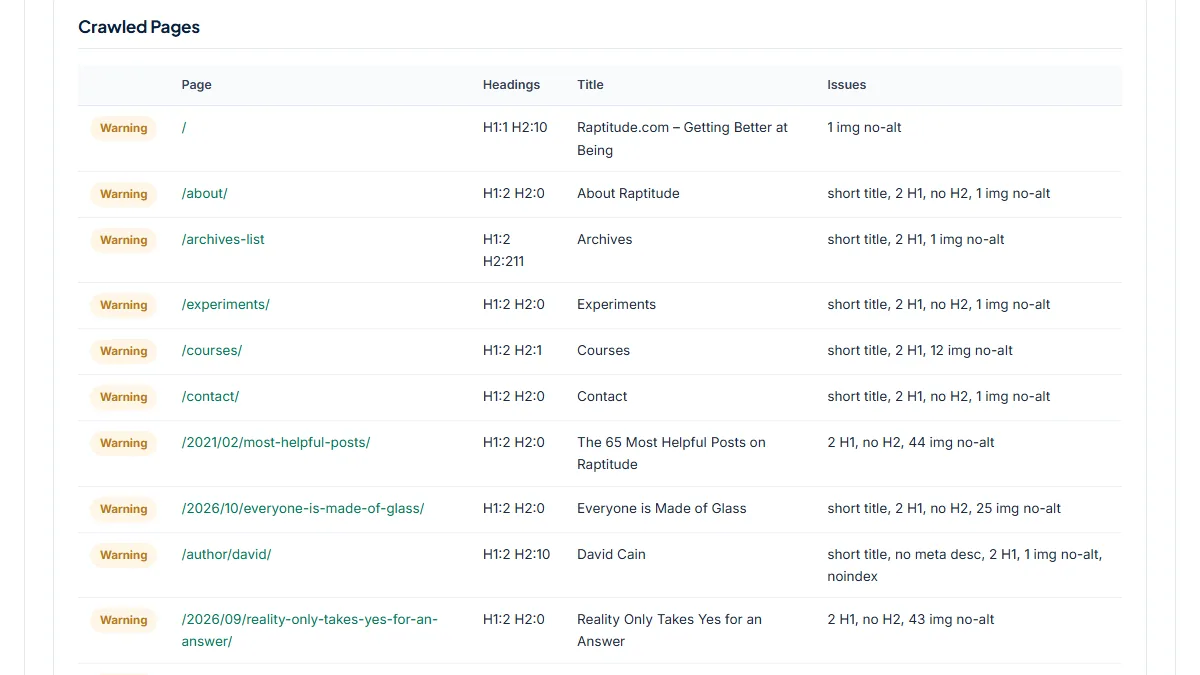
- 12 pages crawled, Overall Score 53/100, Health Score 36%, 1 failed check and 6 warnings. The failed check is All pages indexable, 1 page: /author/david/, whose robots tag reads "noindex, nofollow". On a one-author blog that looks deliberate, so it is a setting to confirm, not a fix. The bigger pattern is "2 H1" on 11 of 12 pages: the theme wraps the site name in an H1 above each page title, so one header edit clears it everywhere. Also: no H2 on 8 pages, 7 short titles and 203 of 232 images without ALT. No broken links; the only redirect is the menu's /archives-list going to /archives-list/. The menu also links /feed/, which the crawler now skips.
2. A category archive in the menu, with no description and ten redirects
- Situation
- A large personal-finance blog whose header links a "classics" category. Same day.
- Input
https://www.mrmoneymustache.com/- Reading the result
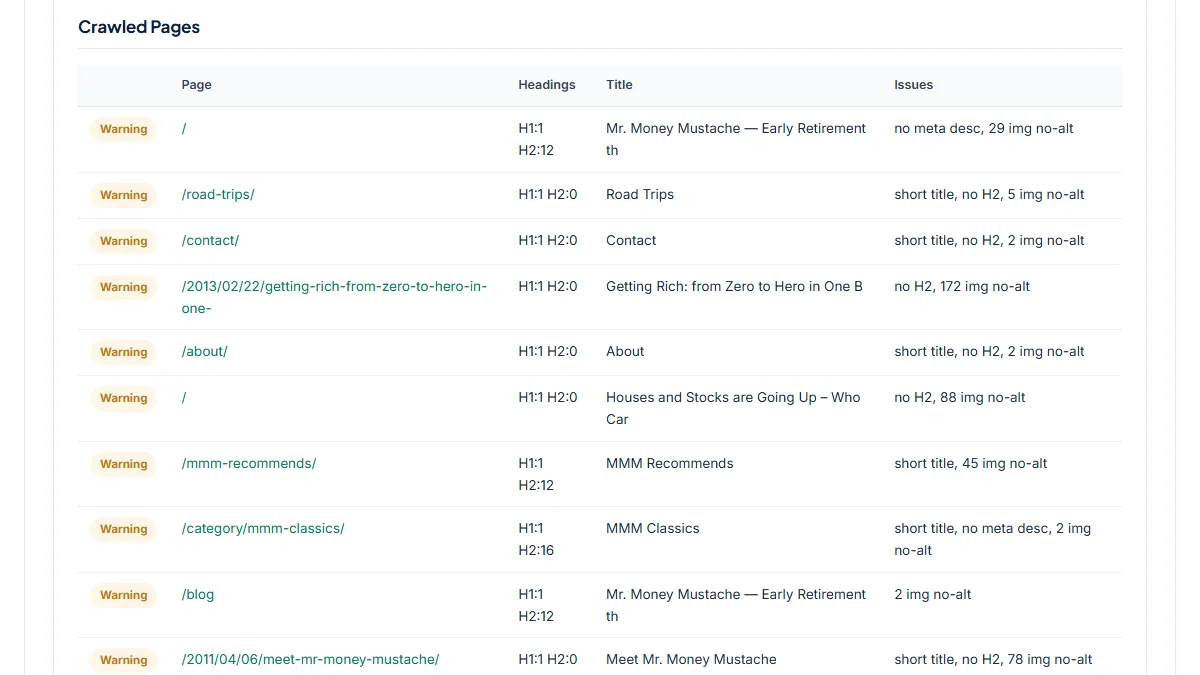
- Overall Score 73/100, 0 failed checks, 5 warnings. The archive /category/mmm-classics/ was crawled: title "MMM Classics" (short), no meta description, indexable. Only it and the homepage lack a description, which points at the archive settings rather than the posts. The 10 redirected links include four internal ones the owner controls: /blog, /disclaimer and /category/mmm-classics without their trailing slash, and /road-trips/%20, a menu link with a stray space. The rest are a newsletter short link, X, Facebook (sent to a login page) and the http:// address. A second row labelled "/" is the theme's random-post link (?redirect_to=random), shown by path only. 592 of 669 images have no ALT.
3. A recipe site whose firewall answers the crawl: 60/100 from one page
- Situation
- A food blog with a menu of recipe categories. Same day.
- Input
https://www.101cookbooks.com/- Reading the result
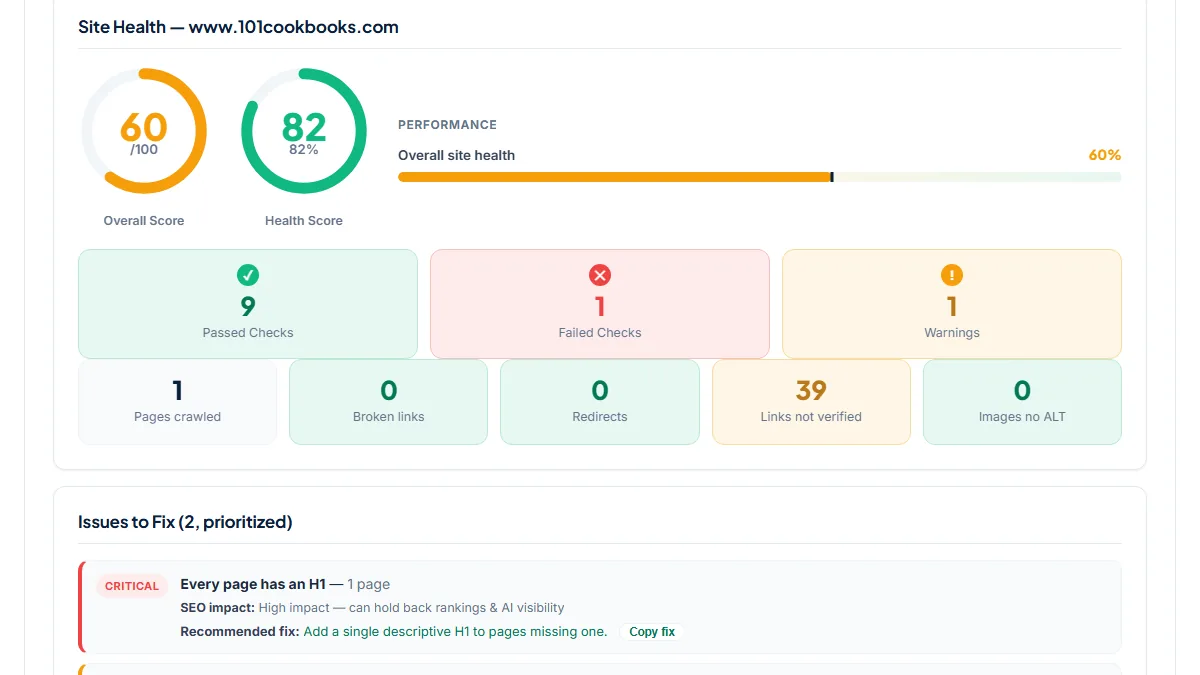
- Pages crawled: 1. The note under Crawled Pages says 11 more pages answered with a bot-protection page and were skipped, and 39 links show as "403 blocked" under Links not verified, the recipe category pages among them. The 60/100 and the Critical "Every page has an H1" come from the homepage alone. Before reading any score, look at Pages crawled; if it is far below 12, a security plugin or the host's firewall refused the burst of requests, and the numbers describe only what got through.
Common mistakes
- Taking a green "No thin-content pages" as proof that your archives are fine. The word count includes menus, sidebars and scripts, so excerpt-heavy archives almost always pass.
- Removing every noindex the report lists. Author, internal search and some tag archives are often noindexed on purpose; only noindex on posts and pages you want found is a problem.
- Reading the score without checking Pages crawled. One page crawled, as on the recipe site, makes the score a homepage score.
- Expecting all tag archives to be checked. Only archives linked early in the homepage HTML are in the sample; start a separate crawl from an archive URL to test its template.
Frequently asked questions
Will it find all my thin tag and category archives?
No. It only reaches archives that are linked among the first internal links of the page you start from, and its thin flag counts every word in the HTML, menus and scripts included, so archives rarely fall under the 250-word line. Use it to see how one archive template behaves: start the crawl from a tag or category URL and read its row. For a full list of archives, your sitemap or a desktop crawler is the right source.
Can it tell whether the "Discourage search engines" setting is still on?
Indirectly. When that box in Settings › Reading is ticked, WordPress prints a noindex robots meta tag on its pages, so the crawl would show noindex on the homepage and on every other crawled row, and All pages indexable would fail with a count close to 12. Noindex on a single author or archive row is a different story and is usually a plugin setting. The tool reports the tag either way; you decide which case it is.
Why are some of my menu links listed as redirected?
Usually because the menu points to a URL without the trailing slash your permalinks use, or to the http:// version of the site, so WordPress redirects each click to the right address. The report shows the link and where it ended up, not each hop. Edit the menu items in the admin so they match the final URL. Social profile links that end on a login page are normal and need no change.
Many pages were skipped or links say "403 blocked". Is my site broken?
Probably not. A security plugin, the host's firewall or a CDN refused the quick series of requests from our server, which is common on WordPress sites. Skipped pages are not scored, and blocked links are not counted as broken. Open a few in your own browser to confirm they load. If you want the crawl to see more, you can allow-list crawlers in your firewall, or run a desktop crawler from your own connection.
Reference: The WordPress.org documentation on search engine optimization warns that once you start using various themes and customizing WordPress, you may break some of its search-engine-friendly features. A crawl of your menu pages is a quick way to see whether that has happened.