Why Freelance SEOs need this
The first week with a new client sets the tone. They have handed over the site and expect a plan, while you still don't know how it is built. A short list of problems with page counts beside each one is a better opening than a promise about rankings, and it is the kind of outcome-led reporting that keeps a retainer.
This crawler gives you a first look in about a minute, with no signup and no login on the client's side. It reads the homepage, follows the first internal links in its HTML (on most sites the menu) and checks up to 12 pages for missing or short titles, missing meta descriptions, H1 and H2 problems, thin text, a noindex meta tag and images without ALT. It also checks up to 40 links for broken and redirected ones.
Twelve pages is not a site audit, and this page doesn't pretend otherwise. It is the quick map that tells you which templates to look at first, before the full crawl and the Search Console review that a first-week audit still needs.
Freelance SEOs specific guidance
Before you crawl: know which 12 pages you will get
Open the client's homepage and look at the menu, because that is roughly what gets crawled: the start page plus the first internal links in its HTML order. Links found on those pages are not followed, the XML sitemap is not read and JavaScript is not run, so a menu built by a script can leave you with very few pages. Only the exact host counts, so enter the address the site redirects to; www and non-www are different hosts here.
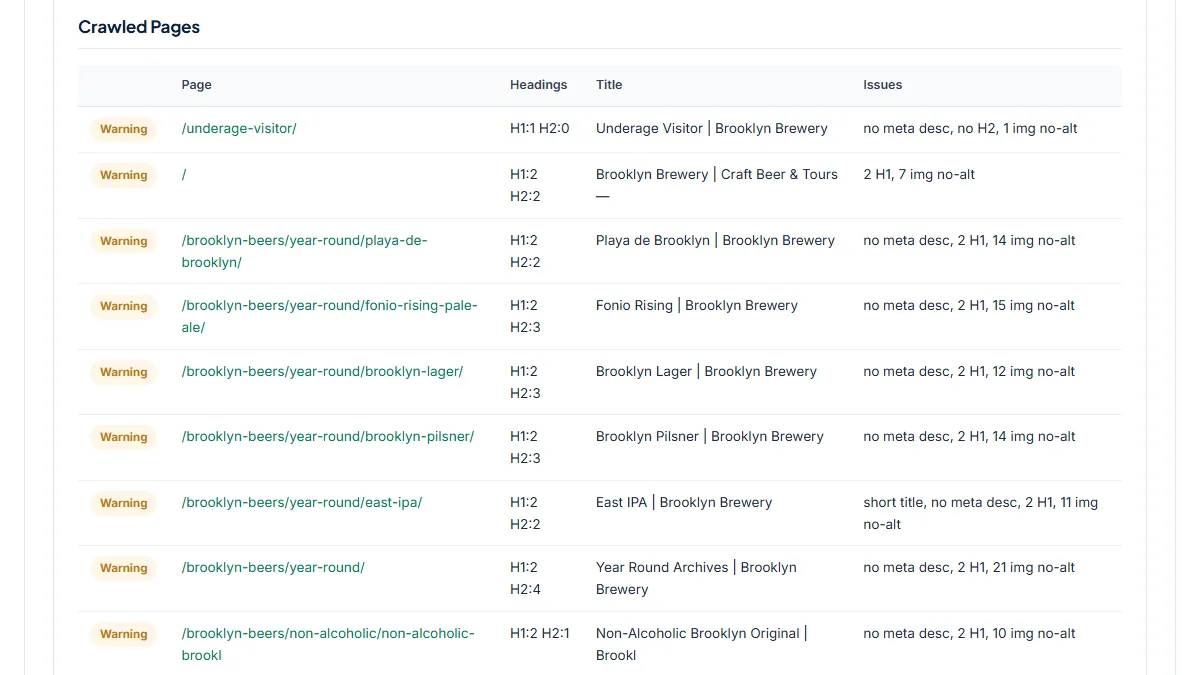
Sometimes the first link is not a menu page. On a brewery site the first page crawled was an /underage-visitor/ age gate. If the client's site sits behind Cloudflare or another bot wall, the tool now stops with a message instead of scoring the challenge page. Ask the client's developer to allow-list crawlers, or run your desktop crawler from your own connection.
Read the Crawled Pages table as a template map
The most useful part for a new client is the Crawled Pages table, not the score. When every service page says "1 img no-alt", or 11 product pages show "2 H1", the problem lives in a shared template, and one fix in the theme clears all of them. That is the finding a client can approve quickly. A problem on one row only usually means one page someone edited by hand.
Treat Overall Score with care. It is a SeoMods formula built from the per-page issues and broken links; images without ALT and redirected links do not lower it at all, so 100/100 can sit next to real work. In the Broken & Redirected Links table, split what the client can fix (internal links to http:// or to a URL without its trailing slash) from what they cannot (Facebook and Instagram profile links that send a crawler to a login page). Links marked "403 blocked" refused the checker; open them in a browser before calling them broken.
From the crawl to the week-one report
Turn the findings into three or four items, each with its page count and the template it points to, and say plainly that they come from a sample of menu pages. Then do the parts this tool cannot: crawl the whole site with a desktop crawler for status codes, canonicals, duplicate titles and orphan pages, and open the client's Search Console for what Google has actually indexed. Re-run this crawl after the fixes go live; the same 12 pages make a clean before-and-after.
What this tool does not tell you
- At most 12 pages per run, taken from the start page's links only: no sitemap, no deeper links, no JavaScript rendering.
- It does not check canonical tags, duplicate titles across pages, structured data, hreflang, page speed or the HTTP status of the crawled pages.
- It shows nothing from Google: no index status, rankings, traffic or backlinks. Use the client's Search Console for that.
- Up to 40 links are checked, mostly from the start page, and a redirect shows only its final URL, not the hops.
Real examples
1. A dental practice that scores 100/100 and still has template work
- Situation
- A freelancer takes on a dental practice in Bellevue, Washington, and crawls its homepage on the first day. We ran it on 10 November 2026.
- Input
https://www.bellevuedentalcare.com/- Reading the result
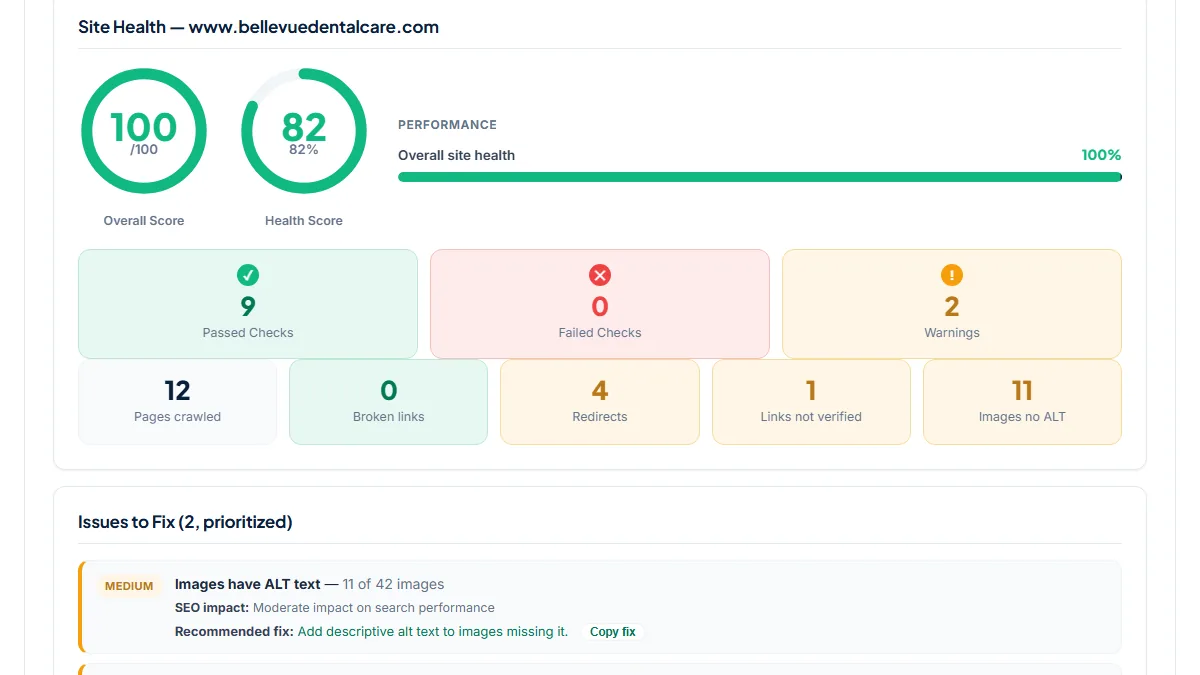
- 12 pages crawled, Overall Score 100/100, Health Score 82%. Every page passed the title, meta description, H1, H2, thin-content and indexability checks. The two warnings: Images have ALT text, 11 of 42 images, and No redirected links, 4 links. The Crawled Pages table shows "1 img no-alt" on each of the 11 service pages, which points to one image in the service-page template. The 4 redirects are a bill-pay short link, a Google Maps link and the Facebook and Instagram profiles, none of which the client needs to change. One WebMD profile link came back "403 blocked". The 100 is real for what it measures; the ALT fix is one template edit to put in the first report.
2. A brewery site where one theme causes most of the list
- Situation
- A brand site with beer pages, events and an online store. Same day, same settings.
- Input
https://www.brooklynbrewery.com/- Reading the result
- The start URL redirected to brooklynbrewery.com, and the first page crawled was the /underage-visitor/ age gate. Overall Score 60/100, 0 failed checks, 6 warnings: meta description missing on 11 of 12 pages, more than one H1 on 11 pages (every beer page shows "2 H1"), 138 of 161 images without ALT, 1 short title ("East IPA | Brooklyn Brewery") and 1 page without H2. The 9 redirected links are the client's own: menu links to http:// store pages and to URLs missing their trailing slash, such as /events and /news. No broken links. Almost everything traces back to the beer-page template and the menu, which makes a short, cheap first fix list.
3. A site behind a bot wall: the crawl stops instead of guessing
- Situation
- Many client sites use Cloudflare's bot protection. We tried a large publishing platform that shows a challenge to our server. Same day.
- Input
https://medium.com/- Reading the result
- The site answered with HTTP 403 and Cloudflare's "Just a moment..." page. Earlier the same day, before today's fix, the tool audited that challenge page as if it were the site and gave 0/100 for one page with no H1 and a noindex tag, a report that would have alarmed any client. Now it stops with: "This site answered our crawler with a bot-protection page (HTTP 403 …) instead of its own homepage, so there is nothing real to audit." For a client site, that is your cue to ask for crawler access or to crawl from your own machine.
Common mistakes
- Calling 12 pages a site audit. The crawl covers the homepage and its first menu links; product, blog and deeper pages are only seen if the menu links to them.
- Sending the client the score. Images without ALT and redirects don't lower Overall Score, so 100/100 on the dental site still came with 11 images to fix.
- Listing every redirect as client work. Social profile links that bounce a crawler to a login page are normal; internal http:// and missing-slash links are the ones to fix.
- Reading "403 blocked" links as broken. The server refused the checker, often because of bot protection; open them in a browser first.
Frequently asked questions
How many pages does it crawl, and which ones?
Up to 12 per run: the start page plus the first internal links in its HTML, in the order they appear. On most sites that means the menu, but sometimes it is an age gate, a login page or a legal page. Links on those pages are not followed and the sitemap is not read, so you can't pick the pages. To check a different section, start the crawl from that section's page; the same limits apply.
Is this enough for a first-week technical audit?
No, and it is not meant to be. It is the first-day map: which templates have title, meta, heading or ALT problems, and which links redirect or fail. A full first-week audit still needs a crawl of the whole site with a desktop crawler, for status codes, canonicals, duplicates and orphan pages, plus the client's Search Console for indexing. Use this crawl to decide where to look first.
What happens if the client's site uses Cloudflare or another bot wall?
If the homepage answers with a challenge page such as Cloudflare's "Just a moment", a captcha or a "Security Check" page, the tool stops and says so instead of scoring that page. If only some inner pages are walled, they are skipped and counted in a note under Crawled Pages. Ask the client's developer to allow-list crawlers, or run a desktop crawler from your own connection.
Can I show the result to the client as it is?
Use it as evidence, not as the report. The Crawled Pages table and the issue counts are easy to show, but Overall Score is a SeoMods formula, not a Google measure, and it ignores missing ALT text and redirects. Pull out the template-level findings, say they come from a sample of menu pages, and add what the full crawl and Search Console show before you send anything.
Reference: In Ahrefs' lessons from ten years as an SEO freelancer, a web crawling and diagnostics tool is one of the handful of tools the author runs the whole business on. This free 12-page crawl is the quick first look before that full crawl, not a replacement for it.