Why YouTube Creators need this
For most channels the bulk of views comes from inside YouTube, but Google also shows videos on its own results page, and only for some searches. A tutorial built around one of those searches can pick up web traffic on top of YouTube traffic. Built around a phrase Google answers with articles and shops, it gets YouTube viewers only. Most creators find out which case they are in after the upload.
The phrase also has to be chosen before filming. YouTube's help says tags play only a minimal role in discovery, while the title and description matter more, so the search phrase belongs in the title you script the video around.
This tool gives you two quick readings of a phrase. First, a prediction of seven Google features from the wording alone. Second, live Google and YouTube autocomplete side by side: what people type after the phrase on each, which completions both share, and which Google completions ask for a video outright. It does not see Google's results page. The last step, one private-window search, is yours.
YouTube Creators specific guidance
Tips for YouTube Creators
Type the topic the way a viewer would search it, in a few plain words. "how to edit videos on iphone" works; your planned title, with the hook and the emoji, does not.
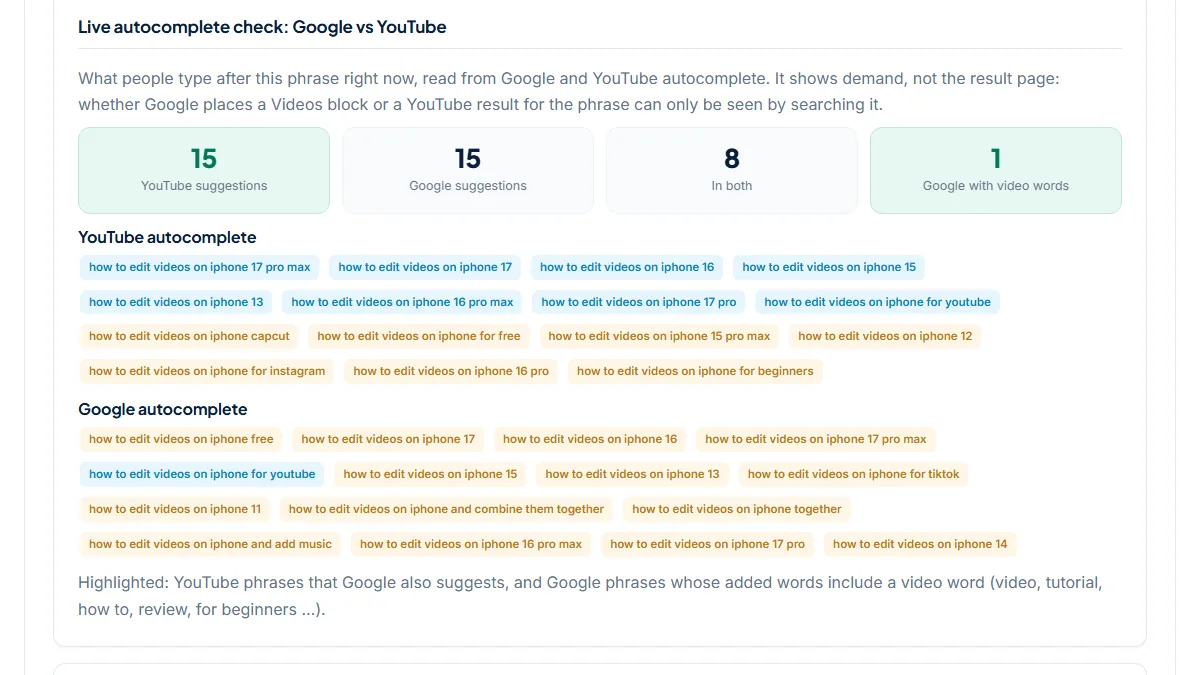
Read the Video Results row as a test of wording only. It turns Likely when the phrase contains how to, tutorial, review, unboxing, recipe or workout (plurals count too) or one of a few Turkish video words, and for nothing else. The useful part for a creator is "Live autocomplete check: Google vs YouTube". YouTube suggestions counts the completions YouTube offers, up to 15; a full list means people do search this on YouTube. In both counts the YouTube phrases that Google also suggests word for word. Google with video words counts Google completions that add words such as video, youtube, tutorial, step by step or for beginners: people asking Google for a video directly.
Then read the words, not only the numbers. Creator names in the YouTube list mean established channels already own the search. Site names in the Google list (reddit, verge, cnet) mean Google searchers want something to read. Problems such as "not rising" are video ideas in their own right, and model numbers tell you which version to name in the title.
Finish with the check the tool cannot make. Search your shortlisted phrase on Google in a private window, set to your main audience's country, and look for a Videos block or YouTube results on the first page. If they are there, title the video with that exact phrase. If not, the video can still do well on YouTube; just don't plan on Google views.
The costliest mistake
The common mistake is to read "Likely" as proof. It is a reading of the words in your phrase, and adding "tutorial" to the box changes the label, not Google. The opposite mistake costs more: dropping a topic because Video Results says Unlikely while YouTube autocomplete is full of process searches.
Quick start
- Enter the topic as a viewer would search it.
- Note the Video Results row, then open the live autocomplete check.
- Copy the In both phrases and any Google with video words phrases.
- Pick the most specific phrase that fits your video.
- Search it on Google in a private window before you write the title.
What this tool does not tell you
- It does not see Google's results page, so it cannot confirm a Videos block, a YouTube result or a short-video carousel. A manual Google search is the only confirmation.
- It gives no search volume, views, YouTube competition or rankings. Up to 15 suggestions per side is a sign of demand, not its size.
- The video prediction reads a short list of trigger words: how to, tutorial, review, unboxing, recipe, workout and their plurals, plus a few Turkish ones. A topic without them, such as "sourdough starter", is always Unlikely.
- There is no country setting. Autocomplete is asked in the page language without a country, so your viewers may see different completions.
Real examples
1. How to edit videos on iPhone: a tutorial topic with demand on both sides
- Situation
- A creator who films phone-editing tutorials checks a topic for the next upload. We ran the phrase on 7 November 2026.
- Input
how to edit videos on iphone- Reading the result
- 3 of 7 features Likely: Featured Snippet, People Also Ask and Video Results (the phrase contains "how to"). Live autocomplete: 15 YouTube suggestions, 15 Google suggestions, 8 in both and 1 Google with video words ("for youtube"). Most of the shared phrases are iPhone models: 17 pro max, 17, 16, 15, 13. YouTube alone adds "capcut", "for instagram" and "for beginners"; Google alone adds "for tiktok", "and add music" and "and combine them together". The topic holds up on both platforms, and the model numbers say a title naming one model, or one that works for all, will match what people type.
2. iPhone 17 Pro review: Likely by wording, zero overlap in what people type
- Situation
- A tech channel weighs a review of a phone that is already a year old. Same day, same settings.
- Input
iphone 17 pro review- Reading the result
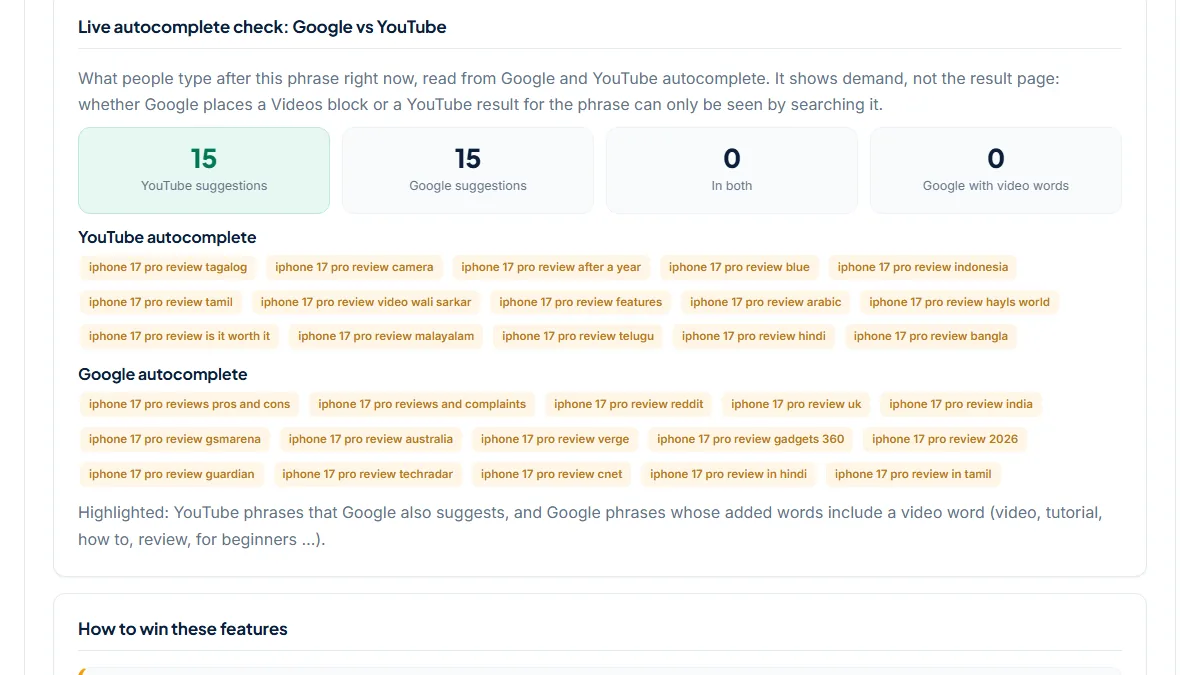
- 2 Likely: Video Results and Reviews / Ratings, both from the word "review". But the autocomplete check shows 0 in both and 0 Google with video words across 15 + 15 suggestions. On YouTube people add languages (tagalog, tamil, hindi, bangla and three more), "after a year", "is it worth it" and two creator names. On Google they add publications (reddit, gsmarena, verge, techradar, cnet, guardian) and countries. Google searchers here look for written reviews, so only a manual search can show whether a Videos block appears at all, while "after a year" is a clear YouTube angle. The two Likely labels would appear for any phrase that says "review"; they tell you nothing about this particular results page.
3. Sourdough starter: Video Unlikely, yet YouTube is full of process searches
- Situation
- A baking channel considers a starter series. Same day.
- Input
sourdough starter- Reading the result
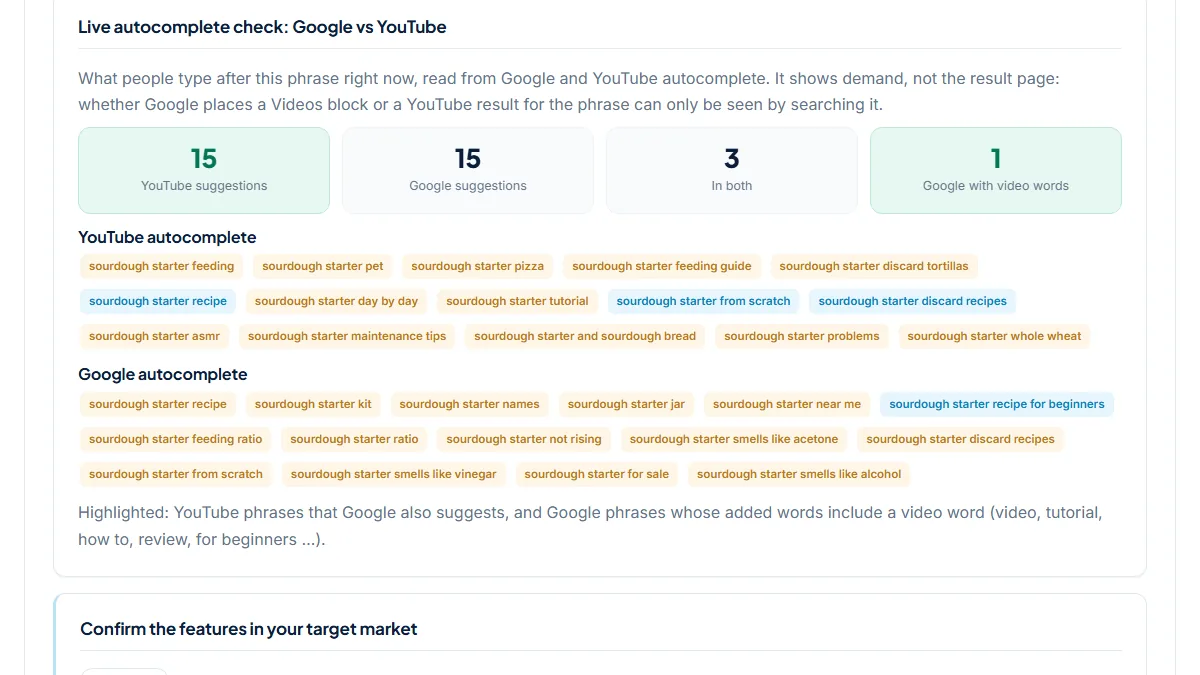
- 0 of 7 features Likely; Video Results is Unlikely because none of the six trigger words is in the phrase. The autocomplete check tells a different story: 15 YouTube suggestions, among them "feeding guide", "day by day", "tutorial", "maintenance tips" and "problems", 3 in both ("recipe", "from scratch", "discard recipes") and 1 Google with video words ("recipe for beginners"). Google also adds shop words (kit, jar, near me, for sale) and problems ("not rising", "smells like vinegar"). The gap is the lesson: the topic is video demand, and a title such as "sourdough starter day by day" or a fix for "not rising" is the phrase to test on Google.
Common mistakes
- Treating "Likely" as proof that Google shows a Videos block. It comes from a few trigger words in the phrase; only a Google search shows the real page.
- Dropping a topic because Video Results says Unlikely. "sourdough starter" scores 0 Likely features and still fills the YouTube list with process searches.
- Filming the broad phrase when the lists name the angle: a model number, "after a year", "day by day". The specific phrase is easier to match in a title.
- Checking Google in your usual signed-in browser and another country than your viewers'. Results vary by place and history, so use a private window set to your main market.
Frequently asked questions
Does this tool show whether Google has a video carousel for my topic?
No. It never loads Google's results page. It predicts features from the words in your phrase and reads Google and YouTube autocomplete, which shows what people type, not what Google puts on the page. Use it to shortlist phrases that look like video searches, then search the one you choose on Google in a private window. If a Videos block or YouTube results appear on the first page, the phrase can bring views from Google as well as YouTube.
What do "In both" and "Google with video words" mean?
In both counts the YouTube suggestions that Google also offers, word for word. Those are angles with demand on both platforms, like the iPhone model numbers in our first example. Google with video words counts Google suggestions whose added words include video, youtube, tutorial, how to, review, step by step, for beginners or explained. They are people asking Google for a video directly, which makes them strong candidates for the manual check.
Why does it say Video Results Unlikely for a topic people clearly watch?
Because the prediction only looks for six English trigger words and their plurals (how to, tutorial, review, unboxing, recipe, workout), plus a few Turkish ones. "sourdough starter" has none of them, so it is Unlikely, even though YouTube completes it with "tutorial", "day by day" and "feeding guide". Read the label as a note about wording and trust the autocomplete lists for demand. Adding "tutorial" to your phrase would flip the label without changing anything Google does.
Should the phrase I find go into my tags?
Mostly into the title and description. YouTube's help says tags play only a minimal role in discovery and are most useful for words people often misspell, while the title, thumbnail and description matter more. It also warns that stuffing a description with tags breaks its spam policies. Put the chosen phrase in the title, say it naturally in the first lines of the description and in the video itself, and keep tags to a few honest variations.
Reference: Backlinko's guide to ranking YouTube videos is where the idea this page tests comes from: a video built around a keyword that already shows video results in Google can get views from web search as well as from YouTube, and you find those keywords by searching them.