Why Amazon Sellers need this
Listing copy grows by addition. A new phrase from a competitor goes into the title, another into a bullet, and after a few rounds of edits the same product word sits in every line. Amazon's own seller guide warns that repeating or overusing keywords can create a poor customer experience and hurt rankings. The repeats are hard to see while you edit one field at a time; they show up when the whole page is read in one go.
This checker fetches a public page and counts every visible word and every two- and three-word phrase on it, with a count and a share of the total. Point it at your detail page and the product word you leaned on most rises to the top of the lists.
Two things make an Amazon page different from a blog post, and this page is built around them. Amazon prints your title several times on the page and your bullets twice, so a phrase you wrote once already starts at four or five. And the page Amazon sends back is not always your listing: check the Analyzed URL row before you trust a single number.
Amazon Sellers specific guidance
Run the right address and check what came back
Copy the address of your listing from the marketplace where it is live, the short /dp/ form with your ASIN is enough, and run it. The first row of the report, Analyzed URL, is the address the tool really read after redirects. If it still ends in /dp/ and your ASIN, the counts are of your detail page. In our runs on 9 November 2026, amazon.com answered with a /clp/ address instead for every third-party listing we tried: a comparison page that shows your title once next to about twenty rival products and none of your bullets. The same ASIN on amazon.co.uk returned the real detail page. If you get /clp/, run the listing on another marketplace where the same copy is live, or paste the title and each bullet into the Word Counter, whose Top Keywords card counts pasted text.
Subtract what Amazon prints on its own
Skip the top of the single-word list first. Words such as amazon, product, item, free and return come from the page around your listing: menus, delivery and returns text, buttons. Then remember the baseline. On a detail page your title appears four or five times (main title, image block, product summary, description and similar spots) and the bullets twice, so a phrase used once in the title will show a count of four or five with no repetition at all. Read the 2-word and 3-word lists for phrases from your own copy. Add singular and plural together, because "spatula" and "spatulas" are separate rows, and know that a hyphen splits a word, so "Non-Stick" is counted as "non" plus "stick".
Decide which repeats to rewrite
A phrase is worth a second look when its count is well above that title baseline and you can find it in most of your bullets as well. Open the listing next to the report and search the page for the phrase to see where each copy sits. Keep it where it names the product, usually once in the title, and replace the other uses with what a shopper needs to decide: size, what is in the box, material, how to clean it. The tool gives no target percentage and Amazon publishes none, so judge by reading, not by a number. When your edit is live, run the same address again and compare the counts.
What this tool does not tell you
- It reads a live URL only. There is no box for pasted text, so a draft title or bullets that are not published yet cannot be checked here; the Word Counter takes pasted text.
- It counts the whole page and cannot tell your title from your bullets, the description, review snippets or Amazon's own widgets. Where a phrase sits, you find by searching the page.
- It does not see backend search terms, which are not on the page, and it has no search volume, ranking or sales data.
- Amazon decides which page it sends back. On 9 November 2026 amazon.com returned a comparison page for the listings we tried; that can differ by marketplace and change over time.
Real examples
1. A spatula set whose product word outnumbers "amazon"
- Situation
- A three-piece silicone spatula set (ASIN B0CDJJPGQ5) on amazon.co.uk, the kind of page a seller in a crowded kitchen category would check. We ran it on 9 November 2026.
- Input
https://www.amazon.co.uk/dp/B0CDJJPGQ5- Reading the result
- Analyzed URL stayed on
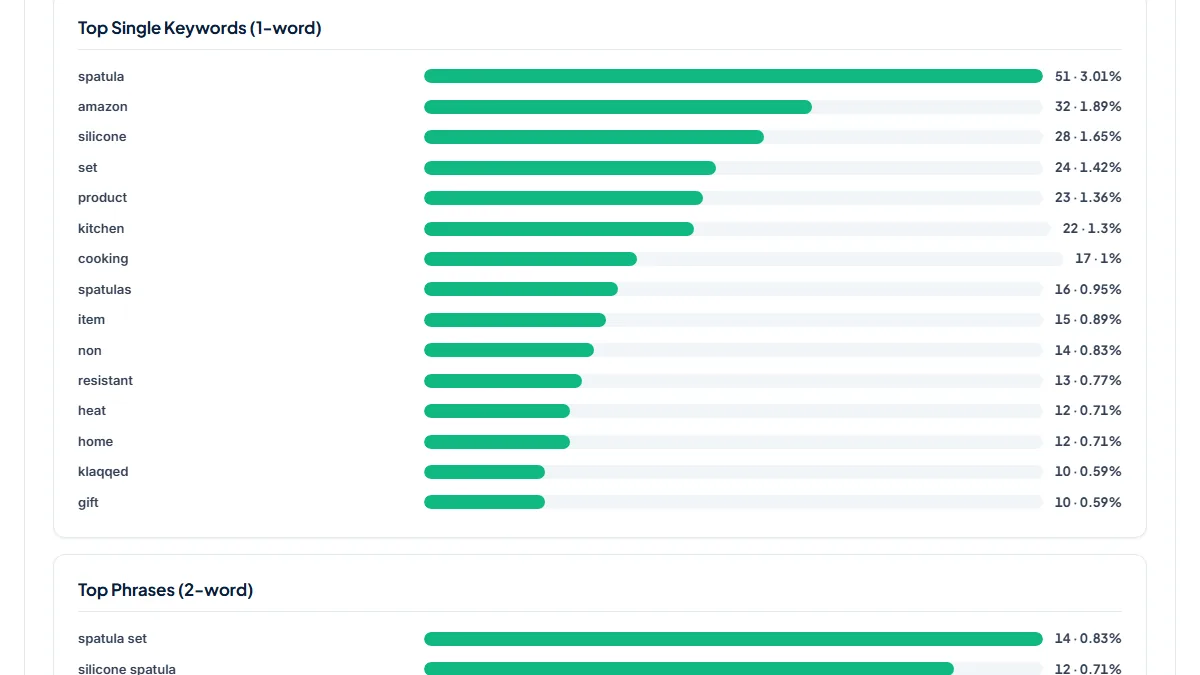
/dp/B0CDJJPGQ5, 1,692 total words. "spatula" was the top word at 51 (3.01 %), ahead of "amazon" at 32, and "spatulas" added another 16. The title alone uses spatula or spatulas five times, and the word is in every one of the five bullets. Title fragments such as "fish turner plastic" sit at 4 in the 3-word list, which is the title being printed four times, not four separate uses. When a product word beats Amazon's own name on Amazon's page, the repetition is in the copy, and the title is the first place to trim it.
2. A five-piece set where a material claim leads the phrases
- Situation
- A five-piece silicone spatula and spoon set (ASIN B084H89YLC) on amazon.co.uk, same day.
- Input
https://www.amazon.co.uk/dp/B084H89YLC- Reading the result
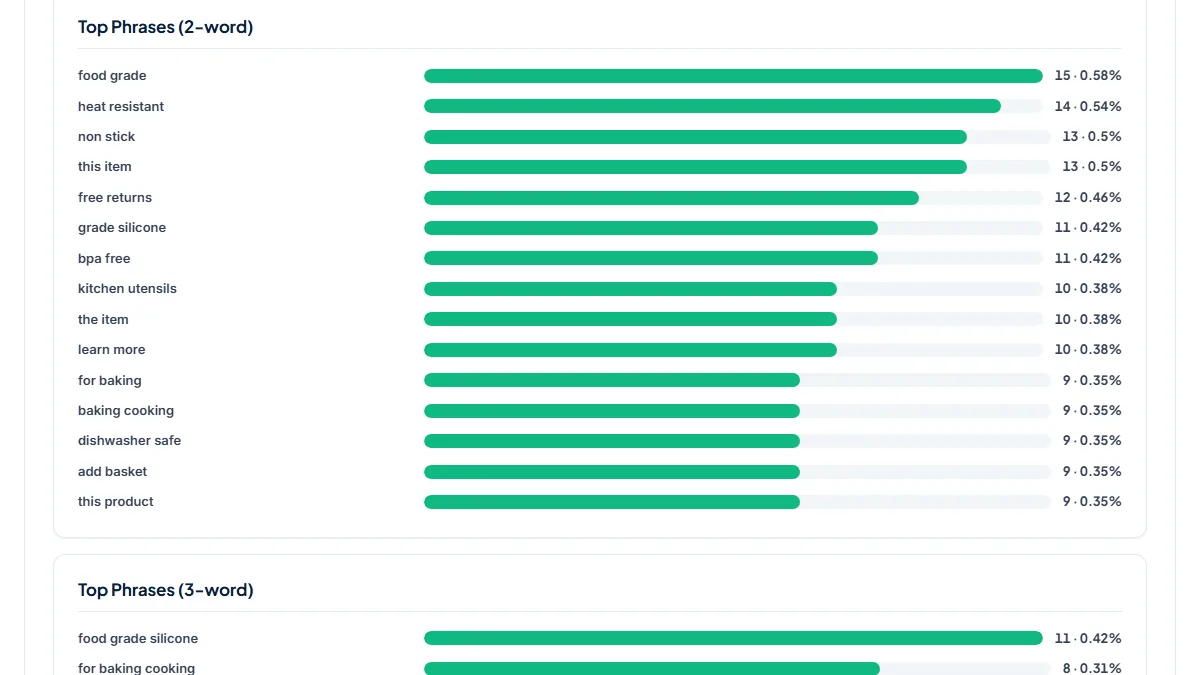
- 2,603 total words. The single-word list starts with page words, "amazon" and "product" at 40 each, and the product word "spatula" follows at 30 (1.15 %). The 2-word list is led by "food grade" at 15, with "food grade silicone" at 11 in the 3-word list. Reading the page shows where the 15 come from: five prints of the title, the first bullet saying it twice (printed twice), the description, the specifications table and a few related and rival product titles. Used once in the title and once in a bullet, the claim is not overused; this is what an even listing looks like once the baseline is taken off.
3. The same spatula set on amazon.com: a comparison page came back
- Situation
- The ASIN from the first example, run on amazon.com the same day.
- Input
https://www.amazon.com/dp/B0CDJJPGQ5- Reading the result
- Analyzed URL read
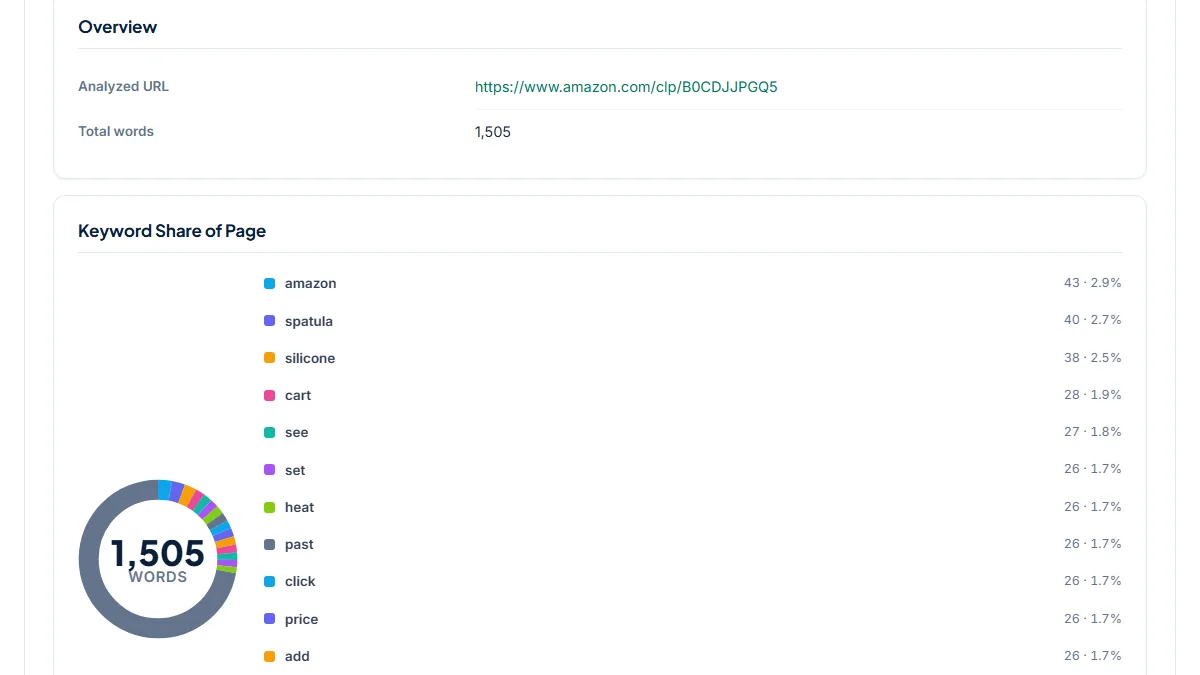
https://www.amazon.com/clp/B0CDJJPGQ5, 1,505 total words. The top 3-word phrase was "click see price" at 26, with "price add cart" at 25 and "bought past week" at 17: buttons and badges from a grid of rival listings, where this listing's title appears once and its bullets not at all. "heat resistant" (24) and "silicone spatula" (19) show what the competition shares, which can be useful, but none of these numbers says anything about this seller's own copy.
Common mistakes
- Trusting the counts without reading Analyzed URL. If it shows
/clp/or any address other than your detail page, every number describes a different page. - Starting at the top of the single-word list. amazon, product, item and free are the page around your listing. Look for your own phrases in the 2-word and 3-word lists.
- Counting a title phrase as overused because it shows 4 or 5. That is the title printed several times. Compare each phrase with that baseline, not with zero.
- Reading singular and plural apart. "spatula" 51 and "spatulas" 16 are one word to a shopper; add the rows before you decide.
- Chasing a density percentage. Neither this tool nor Amazon gives a safe figure. Rewrite what reads repetitive, then re-run to see the counts fall.
Frequently asked questions
Why does Analyzed URL show /clp/ instead of my /dp/ listing?
Because Amazon answered the request with a different page. In our runs on 9 November 2026, amazon.com redirected third-party listings to a /clp/ comparison page, which shows your title once among about twenty rival products and no bullets, while amazon.co.uk returned the real detail page for the same ASIN. If you see /clp/, do not use the counts for your own copy. Run the listing on another marketplace where the same copy is live, or paste each field into the Word Counter.
How many times can I repeat a keyword in an Amazon listing?
There is no published number. Amazon's seller guide says repeating or overusing keywords can create a poor customer experience and hurt rankings, but it gives no count or percentage, and neither does this tool. Use the report to find the phrases that stand out: anything well above the four or five a single title use produces, and present in most bullets, deserves a rewrite. Then read the bullets aloud; if one word keeps coming back, a shopper notices it too.
Can it check my backend search terms?
No. Backend search terms are entered in Seller Central and are not shown on the detail page, so a tool that reads the public page never sees them. To check them, paste the terms into the Word Counter, which reports characters, UTF-8 bytes and the most repeated words of pasted text. Compare that list with the 2-word and 3-word phrases from this report to spot words you are spending on both the page and the backend field.
Can I run a competitor's listing?
Yes, any public detail page works the same way, and comparing two or three rivals shows which phrases the category leans on. Treat their counts with the same care as yours: take off the title baseline, skip the page words, and check that Analyzed URL is the listing you meant. A phrase that every rival repeats is not a reason to repeat it more often in your own copy; it tells you what shoppers will already have read.
Reference: Amazon's seller guide to Amazon SEO is the source for this page's warning: repeating or overusing keywords to boost rankings can create a poor customer experience and hurt rankings.